
Release Notes 1.16
3 June 2026
Catalyst 1.16 gives Super Admins and Config Admins more control over access, task wording, automation behaviour, and troubleshooting information.
The main changes are:
- new Service Account options for integration and automation users,
- IP restrictions for user access,
- configurable task action labels,
- clearer Sequencer behaviour for emails, loops, API calls, and task templates,
- improvements to formatting, help content, browser compatibility, and general platform reliability.
Access and integration control
Service Accounts
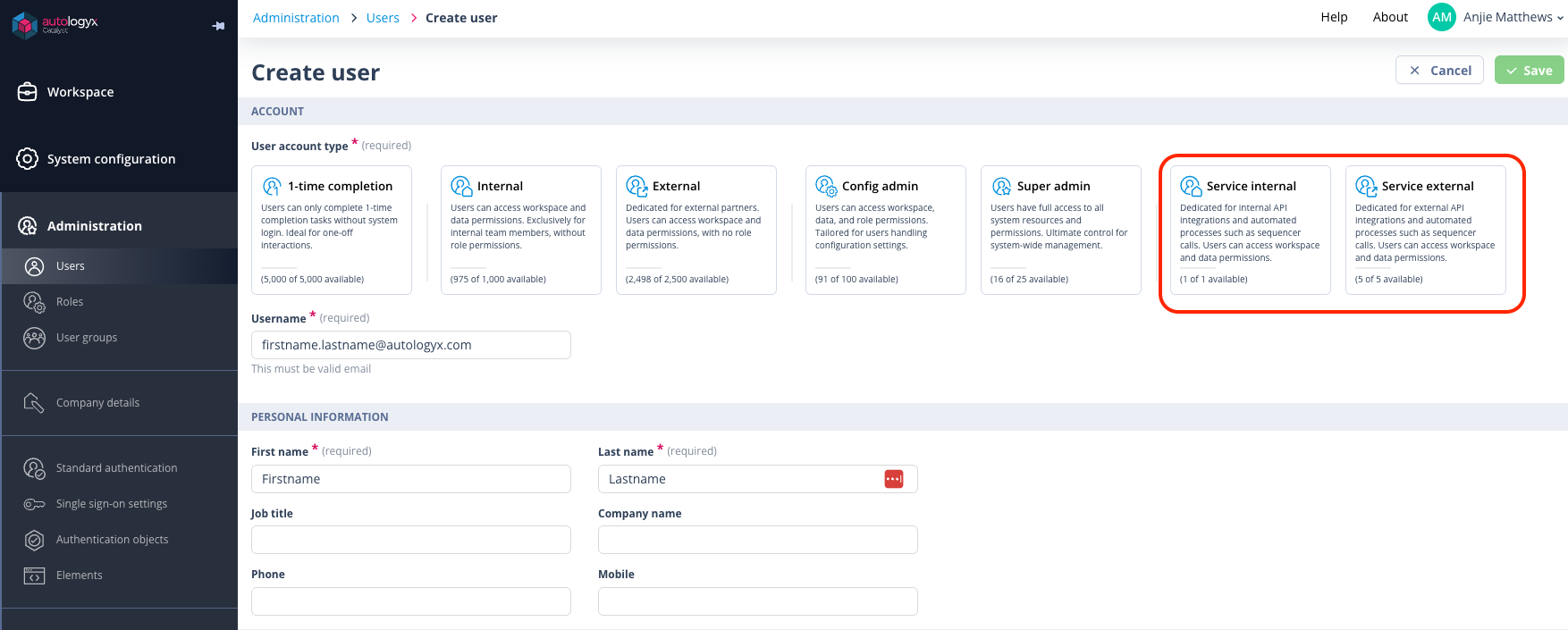
This release adds Service Account user types for integrations and automated processes.
Service Accounts are useful when an integration, sequence, or automated process needs to authenticate to Catalyst without relying on a named person. This helps configuration teams separate human user access from system-to-system access.
You can now create and manage Service Accounts from the user administration area, alongside other users.
There are two Service Account types:
- Service Internal - for internal API integrations and automated Catalyst processes.
- Service External - for external API integrations and automated processes.
Service Accounts can use username and password authentication even where this option has been disabled for other user types in favour of SSO. This helps integrations continue to run without changing the normal login policy for human users.
You can:
- view Service Account details
- create Service Accounts
- edit usernames and personal information
- delete Service Accounts
- reset passwords
- view account-type limits
Service Accounts are automatically activated when created. They do not use the delayed activation flow that applies to some other user accounts.
Things to remember
Once an account has been created as a Service Account, its account type cannot be changed to a standard user account. Standard user accounts also cannot be changed into Service Accounts.
Create a new Service Account when you need a dedicated account for an integration or automated process.
Internal Service Accounts are granted Super Admin permissions. External Service Accounts have no permissions unless permissions are explicitly assigned, so they may need User Groups and Permission Sets on Object Classes.
IP restrictions for users
Users with a Super Admin account type can now restrict user access by IP address.
This gives configuration and administration teams more control over where a user account can be used from. It is helpful where access should be limited to an organisation network, approved office locations, VPN ranges, or other controlled environments.
A new IP Restrictions section is available when creating or editing a user. From this section, you can:
- turn IP restrictions on or off for the user
- add one or more allowed IP ranges
- edit existing IP ranges
- remove IP ranges
- see validation when an entered IP range is not valid
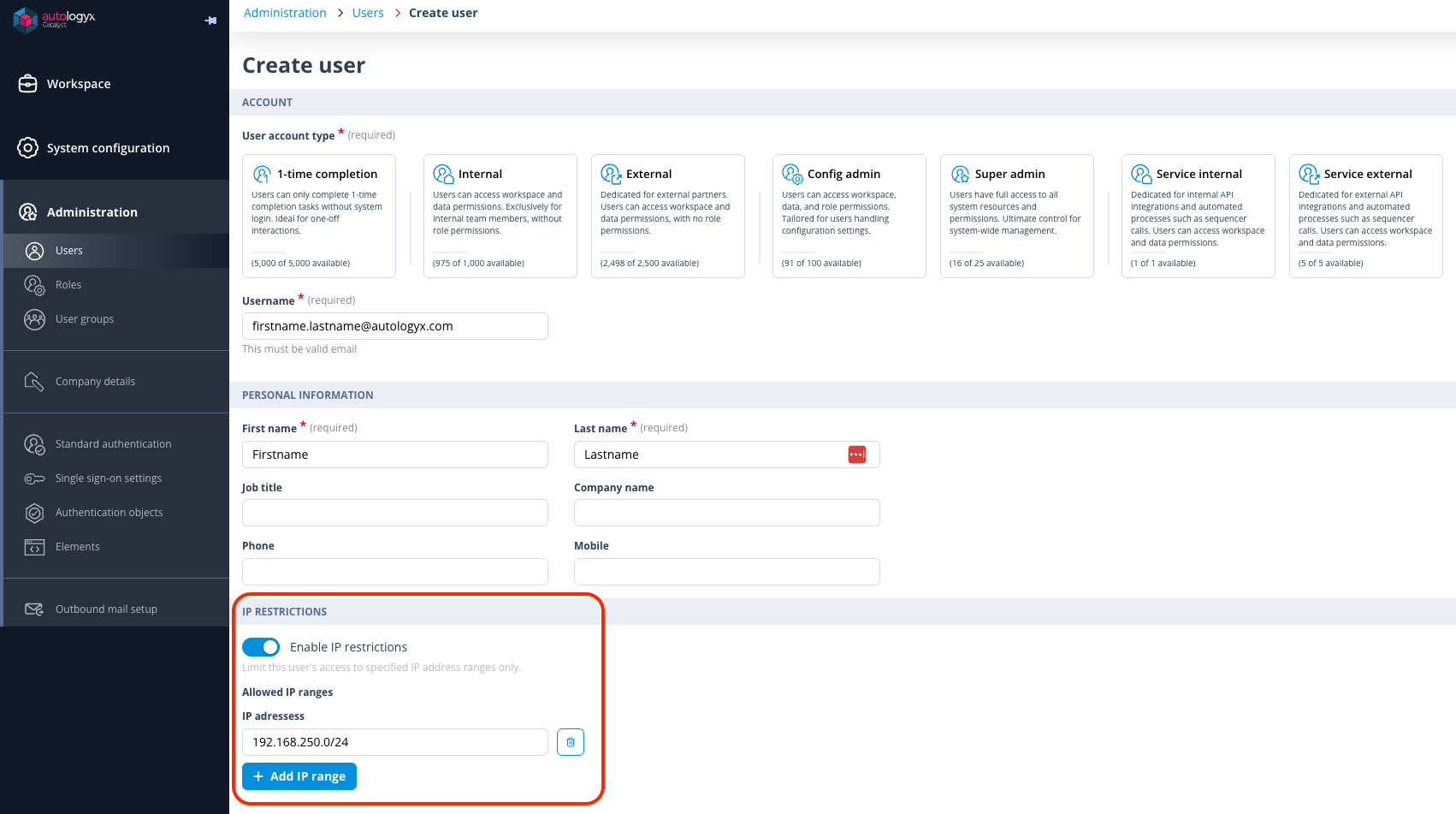
When IP restrictions are enabled, the user can only access Catalyst from one of the allowed ranges.
If a user tries to log in from outside the allowed range, access is blocked and the login page shows a message explaining that the current IP address is not authorised.
If an administrator changes a user's allowed IP ranges, the change takes effect immediately.
The restriction is enforced the next time the user performs an action in Catalyst.
Things to remember
IP restriction changes take effect immediately after the User record is saved.
Use this feature carefully when changing access for active users. If a user's current IP address is no longer allowed, they may be returned to the login page and unsaved work could be lost.
The Enable IP restrictions toggle is not available unless at least one allowed IP range has been added.
Task experience and wording
Configurable task action labels
Configuration users can now change the labels used for task action buttons.
This is useful where the default Complete label is not the best wording for your process. For example, some users may read Complete as a task status rather than an action they need to take. You can now choose wording that better fits your workflow.
Go to:
Theme > Text Overrides
Use the new Task buttons section to configure:
- Actionable tasks label - shown for tasks that are outstanding and need action. The default is Complete.
- View-only tasks label - shown where a task has already been completed or where the user does not have permission to complete it. The default is View.
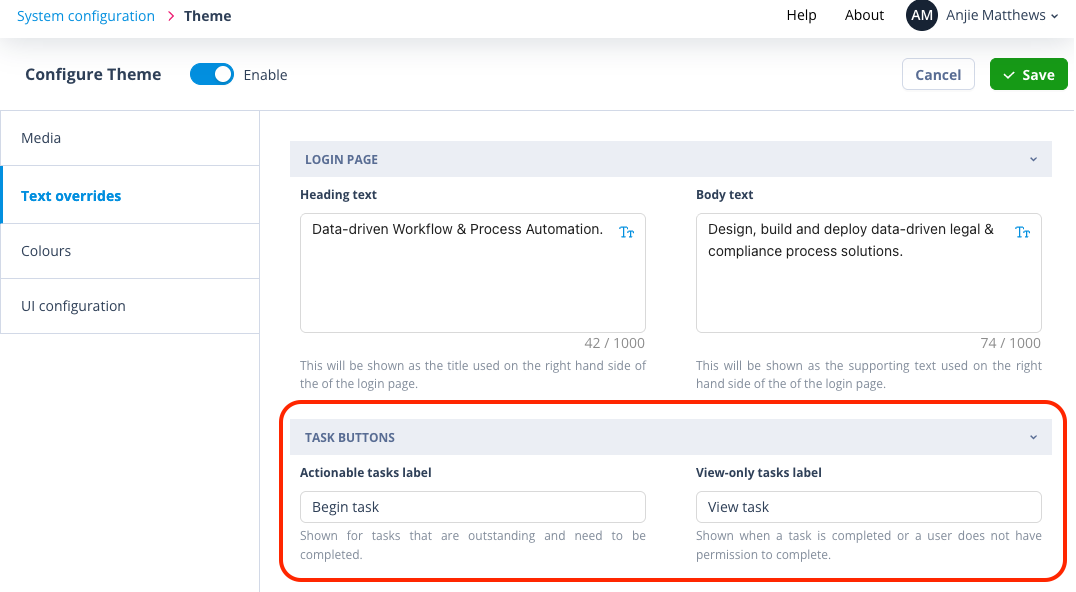
When the theme is enabled, the configured labels are used across the task list, task action menus, and task panel. The change applies to both new and existing tasks.
If the theme is disabled, Catalyst uses the default labels.
Things to remember
These settings change action labels only. They do not change task status chips, task list column names, or task list filters.
Sequencer and communication improvements
Send Message emails are clearer and easier to manage
The Send Message actor now sends one email to the intended recipient group instead of sending a separate email per recipient.
This is especially useful where a message has multiple recipients and someone is copied in. Previously, a copied recipient could receive duplicate emails. In 1.16, recipients and copied recipients receive the expected single message.
Formatting has also been improved for Send Message emails. Highlighted text and background colours are now retained when emails are generated, helping important instructions or warnings stand out as intended.
Better loop testing in Send Message actors
When a Send Message actor is used after a Loop actor, test emails now resolve loop-based merge fields such as {{ loop_item }} and {{ loop_counter }} more reliably.
This makes it easier to test loop-driven communications before activating a sequence.
More helpful API Call notification emails
API Call notification emails now include more information to help configuration users investigate failed integrations.
The notification can include details such as:
- the Catalyst domain
- the sequence name or identifier
- a link back to the sequence
- the API Call name
- the affected record
- the error response returned by the external system
This should make it easier to understand whether an issue relates to configuration, data, permissions, or the external service being called.
API Calls that return files are easier to configure
Some external systems return files, such as PDFs or images, in ways that are difficult to detect automatically.
The API Call actor now includes a Force Download option for these cases. Enable this when an API Call is expected to return a file and the tested response is not being handled correctly as a download.
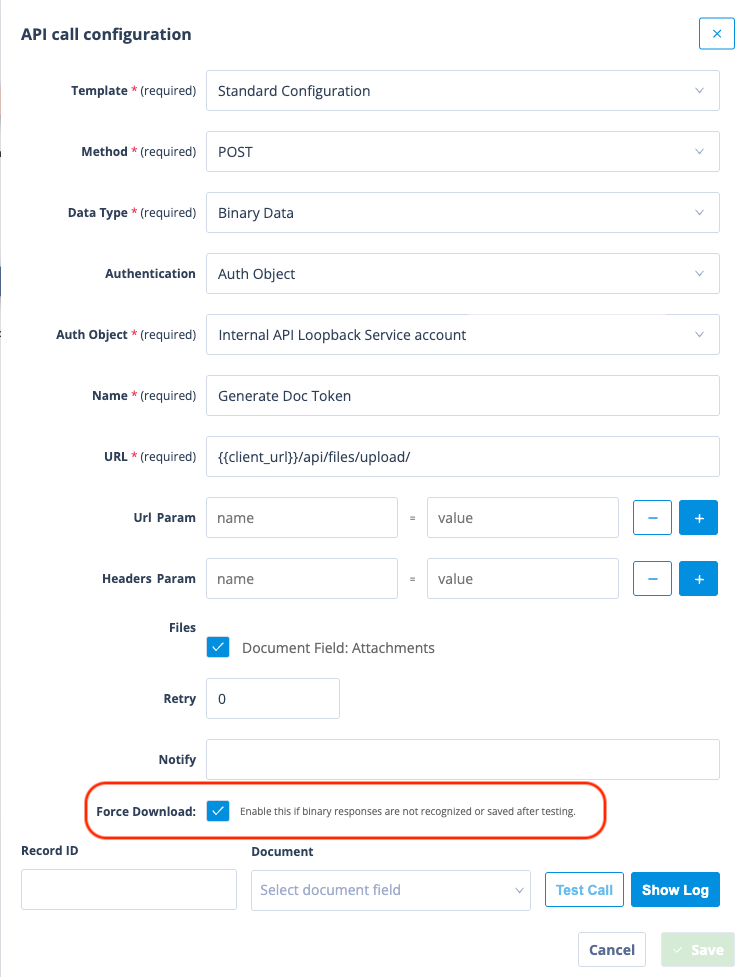
This is useful for document and integration workflows where a sequence needs to work with a file returned by an external service.
Loop actors are more reliable
Several Loop actor behaviours have been improved.
Loop actors can now work more reliably with nested arrays. This helps when you are looping over structured JSON data from an API response or local variable.
Error messages are also clearer when a Loop actor depends on an untested API Call or Local Variable. Instead of showing a more general invalid-output message, Catalyst now indicates that the connected item needs to be tested first.
Loop actor configuration is also more reliable when connected to a Document Picker.
Sequence design is more forgiving
Copying triggers in Sequence Designer now handles unsupported conditions more gracefully.
If a trigger is copied to a place where one of its conditions is not supported, Catalyst can still copy the supported parts and show a message explaining that some conditions could not be copied.
This helps configuration users reuse trigger setup without causing the trigger configuration to get stuck.
Task Template and Task Group Template improvements
Long Task Template names are now handled more cleanly in Set Task actor configuration, reducing layout issues when selecting a template.
Deletion checks for Task Group Templates have also been improved, so templates are less likely to be blocked by incorrect usage information.
Usability, formatting, and help improvements
Instruction text colour formatting
Instruction text formatting has been restored where colour was previously lost.
This helps configuration users keep important guidance visible in forms and tasks. For example, if you use red text to draw attention to a key instruction, that formatting can now be preserved again.
Knowledgebase help panel styling
Styling in the right-hand Knowledgebase help panel has been improved. Background colours and text sizing are more consistent, making embedded help easier to read while working in Catalyst.
Custom components in Safari
Custom components are more reliable in Safari on macOS and iOS, especially where the component needs to receive user, token, or page context from Catalyst.
This improves compatibility for pages that use embedded custom components.
Version visibility and platform maintenance
The Admin Portal can now check the frontend application version, making it easier to confirm which Catalyst build is running.
This release also includes general maintenance and security updates to keep the platform stable and up to date. No configuration change is required for these maintenance updates.
Things to remember
- Review any Service Account limits before creating new accounts for integrations.
- Test IP restrictions with care, especially where users work across VPNs, office networks, or remote locations.
- Keep task labels short enough to fit comfortably in the task panel and task action menu.
- Re-test sequences that use Loop actors, Send Message actors, API Calls, or file downloads before relying on them in a live process.
- Use the improved API Call notification emails to troubleshoot integration issues before escalating to support.