
About Administration
If you are reading this article from the Autologyx application, you are likely to have a Super Admin account type.
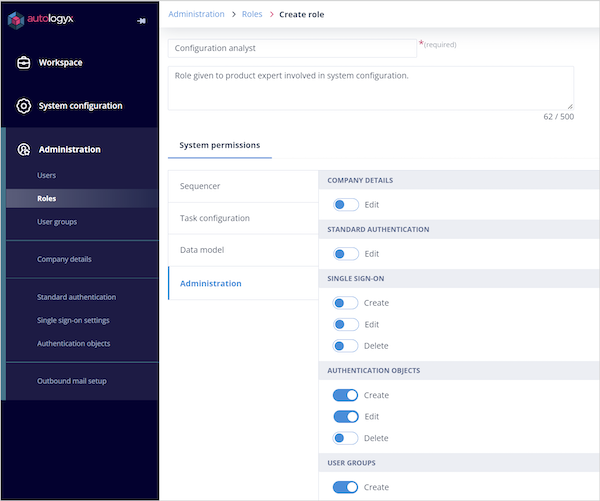
Alternatively, you may have a Role that gives you access to create, edit, or delete one or more Administration areas.
Administration access
Administration areas can be grouped into single page configuration and multiple page configuration.
| Single page configuration | Multiple page configuration |
|---|---|
| Company details | User groups |
| Standard authentication | Single sign-on settings |
| Authentication objects |
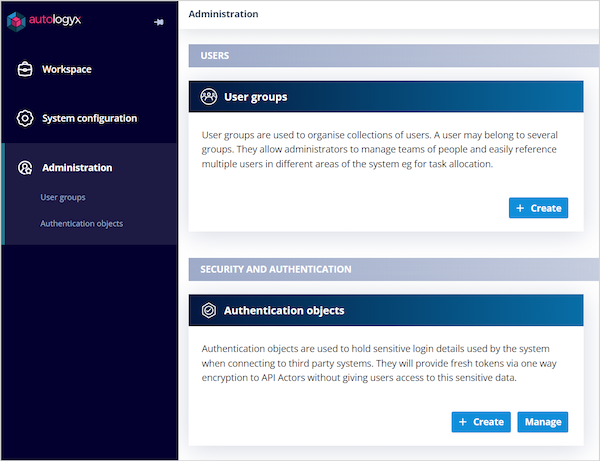
If a user with a Standard account type is given a Role with limited Administration permissions, they will see the Administration section in the left-hand navigation menu, but only the areas they have access to.
For example, a user with access to User groups and Authentication objects would see only those links.
What you will see
If your Role gives you access to all Administration areas, the Administration landing page is divided into three sections containing five tiles.
Each tile provides quick access to create or manage configuration, such as:
- Authentication objects
- Single sign-on settings
- Standard authentication
- Company details
- User groups
If you have a Super Admin account type, you will see additional tiles for:
- Users
- Roles
- Outbound mail setup
You can create new users and Roles, and use the Manage button to open the appropriate list where you can edit or delete existing items.
You can also enter the credentials for the mail service used to send emails from the system.
Tile counters
Tiles for multiple page areas may show a number in the top-right corner. This number tells you how many items exist in that area.
If there is no number, either:
- the tile represents a single page setting
- there are no items in the list
Summary of buttons on Administration tiles
Administration tiles can include the following buttons:
- Configure - shown on tiles for single page settings
- Create - shown on multiple page settings where the user has permission to create items, such as Authentication objects
- Manage - shown on multiple page settings where the user has permission to edit or delete items, such as Single sign-on settings
Things to remember
- The Administration areas you can see depend on your account type and permissions.
- Users with limited Administration access see only the areas included in their Role.
- Super Admin users can access additional areas such as Users, Roles, and Outbound mail setup.
- Tile counters show how many items exist in multiple page configuration areas.
- Single page settings usually show Configure, while list-based areas usually show Create and Manage.