
Azure OpenAI
Azure OpenAI can be used in Autologyx workflows where a Sequence needs to call an OpenAI model that is hosted through a customer’s Azure environment.
This is similar in purpose to the OpenAI actor, but the model call is made through an Azure OpenAI endpoint rather than directly through the public OpenAI API. This can be useful where a customer wants to use OpenAI models while applying Azure-based resource management, authentication, monitoring, networking, governance, and enterprise controls.
This article explains how Azure OpenAI fits into AI and the Sequencer, what the Azure OpenAI actor is used for, and what customers need to consider when preparing their Azure environment.
When to use Azure OpenAI
Use Azure OpenAI where you want a Sequence to use OpenAI models through Azure.
This is often useful where:
- the customer already uses Microsoft Azure for cloud services or AI governance
- the organisation wants OpenAI model access to be managed through Azure resources
- Azure networking, identity, monitoring, policy, or regional controls are required
- the customer has an approved Azure OpenAI deployment
- the workflow needs to use a GPT-style chat model hosted through Azure OpenAI
- the customer wants an enterprise-approved route to OpenAI models
- the workflow needs a private-cloud or Azure-controlled AI access route
Azure OpenAI can be a good fit where the customer wants the capabilities of OpenAI models, but wants the operational and governance model to sit inside Azure.
Before you start
Before configuring Azure OpenAI in Autologyx, check that:
- the Azure OpenAI integration is enabled in the Autologyx environment,
- the customer has an Azure subscription with access to Azure OpenAI,
- the relevant Azure OpenAI resource and model deployment have been created,
- the Azure OpenAI endpoint is available,
- the required authentication details are available through an Authentication Object,
- you have permission to edit the relevant Sequence.
Model availability, deployment options, quotas, and regional availability can change over time. Always check Microsoft documentation and the customer’s Azure configuration before finalising a workflow.
How Azure OpenAI works with the Sequencer
With the Azure OpenAI actor, Autologyx initiates the request as part of a controlled workflow.
A typical Sequence might:
- collect data from an Object Record,
- prepare the prompt or input text,
- call a selected Azure OpenAI model deployment,
- receive the model response,
- store or parse the response,
- update a record, create a task, generate a draft output, or route the workflow.
The Sequencer still controls when the request is made, what information is sent, and what happens when the response is returned. Azure OpenAI provides the Azure-hosted model access route.
Azure OpenAI is not the same as Azure AI Foundry model hosting
This page covers the Azure OpenAI actor in the Sequencer.
The Azure OpenAI actor is designed for OpenAI models that are exposed through an Azure OpenAI endpoint. It is not a general-purpose actor for every model or service that may be available through Azure AI Foundry.
For other private or customer-hosted models, use the guidance for privately hosted models or generic API-based integration patterns.
Why customers may choose Azure OpenAI
Customers may choose Azure OpenAI instead of calling OpenAI APIs directly where their organisation prefers to manage AI access through Azure.
Common reasons include:
- existing Azure cloud strategy
- Azure identity and access management patterns
- Azure networking or private connectivity requirements
- Azure monitoring and logging expectations
- regional or resource-level control
- enterprise governance and policy alignment
- procurement, billing, or operational preference for Azure services
- approved internal patterns for using OpenAI models through Azure
The right choice depends on the customer’s cloud strategy, security model, AI governance requirements, data handling policies, and the models available in the target Azure environment.
Where to find current Azure OpenAI information
Azure OpenAI model availability and setup requirements change over time. New models may be added, deployment types may change, and availability can vary by region, subscription, quota, and cloud.
For the most up-to-date information, refer to Microsoft documentation before finalising a workflow design:
- Azure OpenAI in Microsoft Foundry Models - for the Microsoft overview and current product documentation route
- Azure OpenAI models - for model capabilities, model IDs, deployment types, and region availability
- Azure OpenAI quotas and limits - for current quota and rate-limit guidance
- Data, privacy, and security for Azure OpenAI - for Microsoft’s current data privacy and security information
Autologyx documentation explains how Azure OpenAI fits into AI and the Sequencer. Microsoft documentation should be treated as the source of truth for current model availability, supported regions, model IDs, quotas, pricing, Azure-side setup, and Microsoft data handling details.
Configure the Azure OpenAI actor
Add the actor to a Sequence in the same way as other Sequence actors.
- Go to System Configuration > Sequences.
- Open the Sequence you want to update.
- Find the Azure OpenAI actor in the relevant actor category.
- Drag the actor onto the Sequence canvas.
- Connect it to the appropriate trigger or workflow step.
- Open the actor configuration.
The exact labels available in your environment may depend on the integration version and enabled actors.
Azure OpenAI actor settings
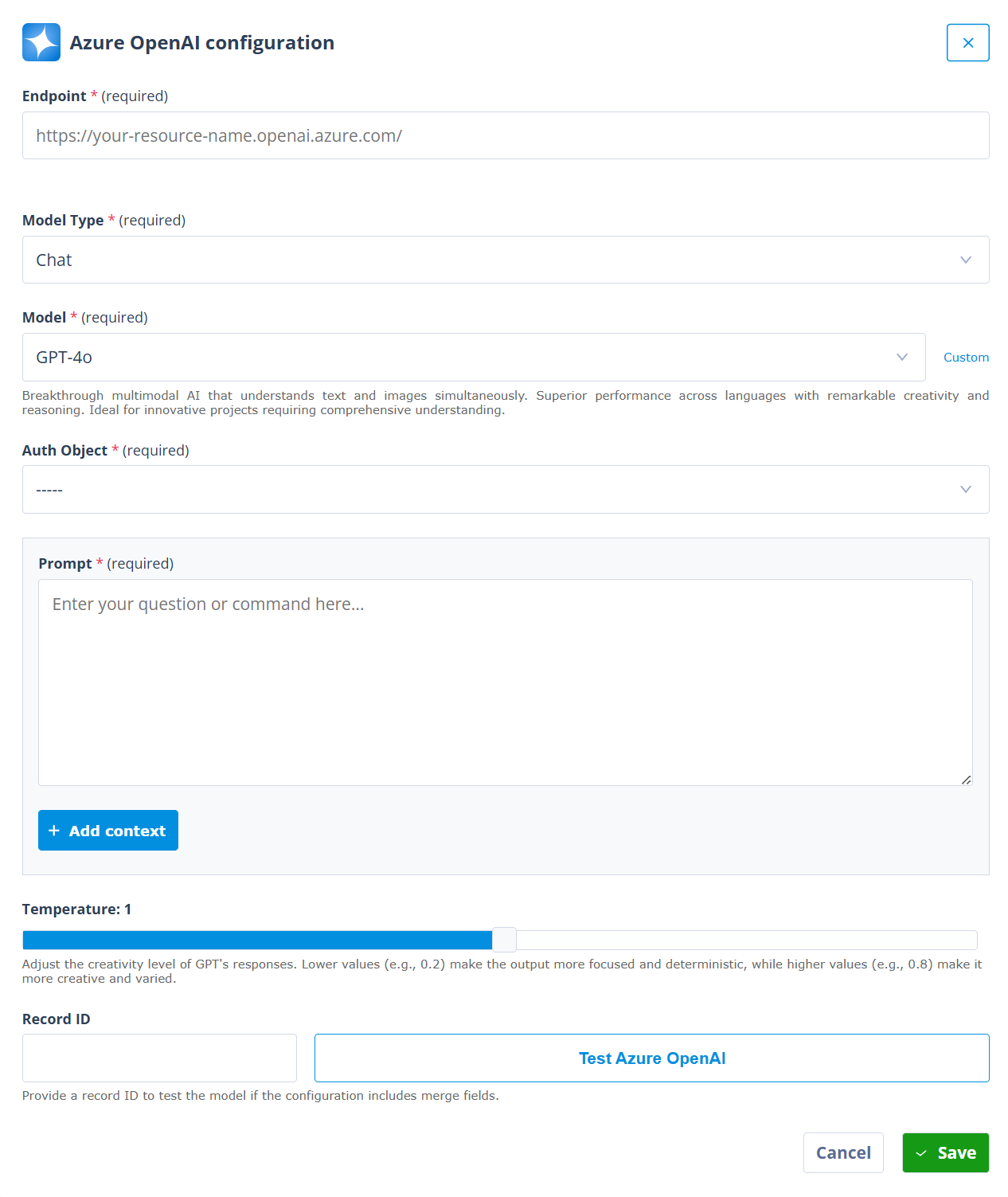
The Azure OpenAI configuration modal allows you to define the endpoint, model type, model, authentication, prompt, context, temperature, and test record.
Endpoint
Enter the Azure OpenAI endpoint for the customer’s Azure OpenAI resource.
The endpoint normally follows the customer’s Azure OpenAI resource name and Azure domain pattern. Use the endpoint provided by the customer’s Azure administrator or implementation team.
Model Type
Select the type of model interaction required.
For example, Chat is used where the workflow needs to send a prompt to a chat model and use the model response inside the Sequence.
The available model types depend on the integration and customer configuration.
Model
Select the Azure OpenAI model that the actor should use.
The available model list depends on the models enabled for the customer’s Azure environment and the deployments configured for the Azure OpenAI resource.
Where available, the modal may show a short description of the selected model to help explain what that model is commonly suited for. Use this as guidance, but choose the model based on the workflow goal, expected input size, response type, cost profile, Azure availability, and customer AI policy.
Auth Object
Select the Authentication Object used to authenticate the request to Azure OpenAI.
This allows the Sequence to make the request without exposing credentials inside the actor configuration.
Prompt
The prompt is the main instruction that will be sent to the model.
A prompt can contain static text and Merge fields from the record being processed. This allows each request to be tailored to the specific Object Record in the workflow.
For example, a prompt could include the body of an inbound email, such as {{ record.field_email_body }}, so that the model can summarise or classify the content in the context of the current record.
Context
Context can be used to give the model additional guidance about how to respond.
Context is optional. Use it where the model needs additional instructions that should sit alongside the prompt. If the workflow does not need separate context, keep the prompt focused.
For example, the context might explain:
- the role the model should perform
- the type of work being processed
- the categories the model can choose from
- the expected output format
- when the model should flag something for human review
For workflow use cases, context is often where you define guardrails for the response.
Temperature
Temperature controls how varied or creative the model response can be.
Lower values are usually better for workflow automation because they make the output more focused and consistent. Higher values may be useful for creative drafting tasks, but they are usually less suitable where the response needs to be parsed or used by later deterministic workflow logic.
The modal guidance explains that lower values, such as 0.2, make responses more focused and more consistent, while higher values, such as 0.8, make responses more creative and varied.
Record ID and Test Azure OpenAI
Where the prompt or context includes merge fields, enter a Record ID before testing. This allows the actor to resolve record-specific values during the test.
Use Test Azure OpenAI to test the request before saving. This helps you check the request and response using real record data before relying on the actor in a live workflow.
Click Save to save the actor configuration. Remember to save the Sequence itself after updating the actor.
Use Azure OpenAI responses in the Sequence
The Azure OpenAI actor response is most useful when it is stored or transformed into data that later Sequence steps can use.
Common patterns include:
- storing the response in a variable
- extracting part of a JSON response
- updating fields on the source record
- creating a task for human review
- sending the result into a document or message
- using the response to decide the next workflow route
For JSON responses, a Local Variable actor can be used to store or extract the content returned by the Azure OpenAI actor.
The exact response path depends on the actor, endpoint, model type, and response structure being used.
JSON outputs and deterministic processing
Azure OpenAI calls are often most useful in Autologyx when the response can be turned into structured data.
For example, a model might be asked to return JSON with fields such as:
{
  "classification": "human_review",
  "summary": "The email appears to request review of a supplier contract.",
  "recommended_next_step": "Create a legal review task",
  "confidence": "medium"
}
This can make it easier for the Sequence to apply deterministic checks after the model has responded.
For example, the Sequence can check whether classification is one of a known set of values before deciding what happens next. It can also send uncertain, incomplete, or unexpected responses to a human review task.
This approach is especially useful when combined with:
- clear prompt instructions
- constrained output schemas
- validation logic
- known allowed values
- Local Variable actors
- API response parsing
- human review gates
Important reminder about model outputs
Important reminder
Azure OpenAI model responses are not deterministic in the same way as conventional workflow logic.
Prompt design, structured JSON, low temperature settings, validation rules, and deterministic Sequence logic can reduce risk, but they cannot absolutely guarantee that a model will always return a perfect, complete, or accurate response.
Where the model returns a specific structured value, the Sequencer can often apply deterministic checks to decide whether the value is acceptable. Where the model produces semantic output, such as a narrative summary, interpretation, or recommendation, customers should strongly consider human review before the output is used for important decisions, external communications, or final record updates.
Things to remember
- Azure OpenAI is for OpenAI models exposed through a customer’s Azure OpenAI endpoint.
- The Azure OpenAI actor is not a general-purpose actor for every model hosted through Azure AI Foundry.
- Customers may choose Azure OpenAI where Azure-based governance, identity, networking, monitoring, or regional controls are important.
- Model availability, deployment types, quotas, and regions can change over time.
- Microsoft documentation should be treated as the source of truth for Azure-side setup and current model availability.
- Use Test Azure OpenAI with a representative record before relying on the actor in a live workflow.
- Prefer structured outputs where the response will drive routing, record updates, or task creation.
- Use human review where outputs are semantic, high impact, externally visible, or difficult to validate automatically.