
AWS Bedrock
AWS Bedrock can be used in Autologyx workflows where a Sequence needs to call a foundation model through Amazon Web Services.
Bedrock is useful where customers want to use AI models through their AWS environment, apply their AWS governance and access controls, and choose from a range of model providers and model families. This can include Amazon models, Anthropic Claude models, Meta models, Mistral models, OpenAI models, and other models made available through Bedrock.
This article explains how AWS Bedrock fits into AI and the Sequencer, what the Bedrock actor is used for, and what customers need to consider when preparing their AWS environment.
When to use AWS Bedrock
Use AWS Bedrock where you want a Sequence to call a model through AWS rather than through a direct public provider integration.
This is often useful where:
- the customer already uses AWS for AI governance or cloud services
- the organisation wants model access to be managed through AWS
- the workflow needs to use a model available through Bedrock
- Claude models are required through AWS Bedrock rather than a native Anthropic actor
- model choice needs to remain flexible across several providers
- the customer wants to align AI access with AWS account, region, and security controls
- the workflow needs a private-cloud or enterprise-controlled AI route
Bedrock can be a flexible option because the same general actor pattern can support different providers and models, depending on what has been enabled in AWS and in the Autologyx environment.
Before you start
Before configuring AWS Bedrock in Autologyx, check that:
- the AWS Bedrock integration is enabled in the Autologyx environment,
- the customer has an AWS account with access to Amazon Bedrock,
- the required model provider and model are available in the relevant AWS region,
- model access has been enabled in AWS where required,
- the required AWS authentication details are available through an Authentication Object,
- you have permission to edit the relevant Sequence.
Model availability changes over time. Not every model is available in every AWS region, and some models require explicit access or setup in AWS before they can be used. Always check the latest AWS Bedrock documentation and the customer’s AWS console before finalising a workflow.
How AWS Bedrock works with the Sequencer
With the Bedrock actor, Autologyx initiates the request as part of a controlled workflow.
A typical Sequence might:
- collect data from an Object Record,
- prepare the input text or prompt,
- call a selected model through AWS Bedrock,
- receive the model response,
- store or parse the response,
- update a record, create a task, generate a draft output, or route the workflow.
The Sequencer still controls when the request is made, what information is sent, and what happens when the response is returned. Bedrock provides the model access route.
Bedrock model providers
The Bedrock actor groups available models by provider.
Provider options may include:
- Amazon
- Anthropic
- Meta
- Mistral
- OpenAI
The exact providers and models shown in the actor depend on the Autologyx integration, the AWS Bedrock configuration, the AWS region, and the models enabled for the customer. Customers should confirm current provider and model availability in AWS before designing or publishing a workflow.
AWS Bedrock itself supports a changing range of foundation models from different providers. Refer to AWS documentation and the customer’s AWS account for the current list of available models, regions, modalities, and model-specific configuration options.
Where to find current AWS Bedrock information
AWS Bedrock model availability changes over time. New models may be added, existing models may change, and availability can vary by AWS region.
For the most up-to-date information, refer to AWS documentation before finalising a workflow design:
- Amazon Bedrock product page - for a general overview of Bedrock, its capabilities, and AWS positioning
- Amazon Bedrock overview - for the AWS user guide overview and links to core Bedrock concepts
- Supported foundation models in Amazon Bedrock - for the current route into model details, model IDs, supported regions, modalities, and inference parameters
- Request access to models - for model access requirements, AWS Marketplace permissions, and provider-specific access steps
AWS describes Amazon Bedrock as a fully managed service that provides secure, enterprise-grade access to foundation models from leading AI companies. AWS also maintains current Bedrock model details outside static Autologyx documentation.
Autologyx documentation explains how Bedrock fits into AI and the Sequencer. AWS documentation should be treated as the source of truth for current Bedrock model availability, supported regions, model IDs, pricing, AWS-side setup, and provider-specific access requirements.
Using Anthropic Claude through AWS Bedrock
Autologyx does not currently require a separate native Anthropic actor for the Sequencer pattern.
Where a customer wants to use Anthropic Claude models, the supported route is through AWS Bedrock, provided the customer’s AWS Bedrock environment has the relevant Anthropic model access enabled.
This means Claude can still be used in AI and the Sequencer workflows, but it is configured as an AWS Bedrock provider and model combination rather than as a separate Anthropic actor.
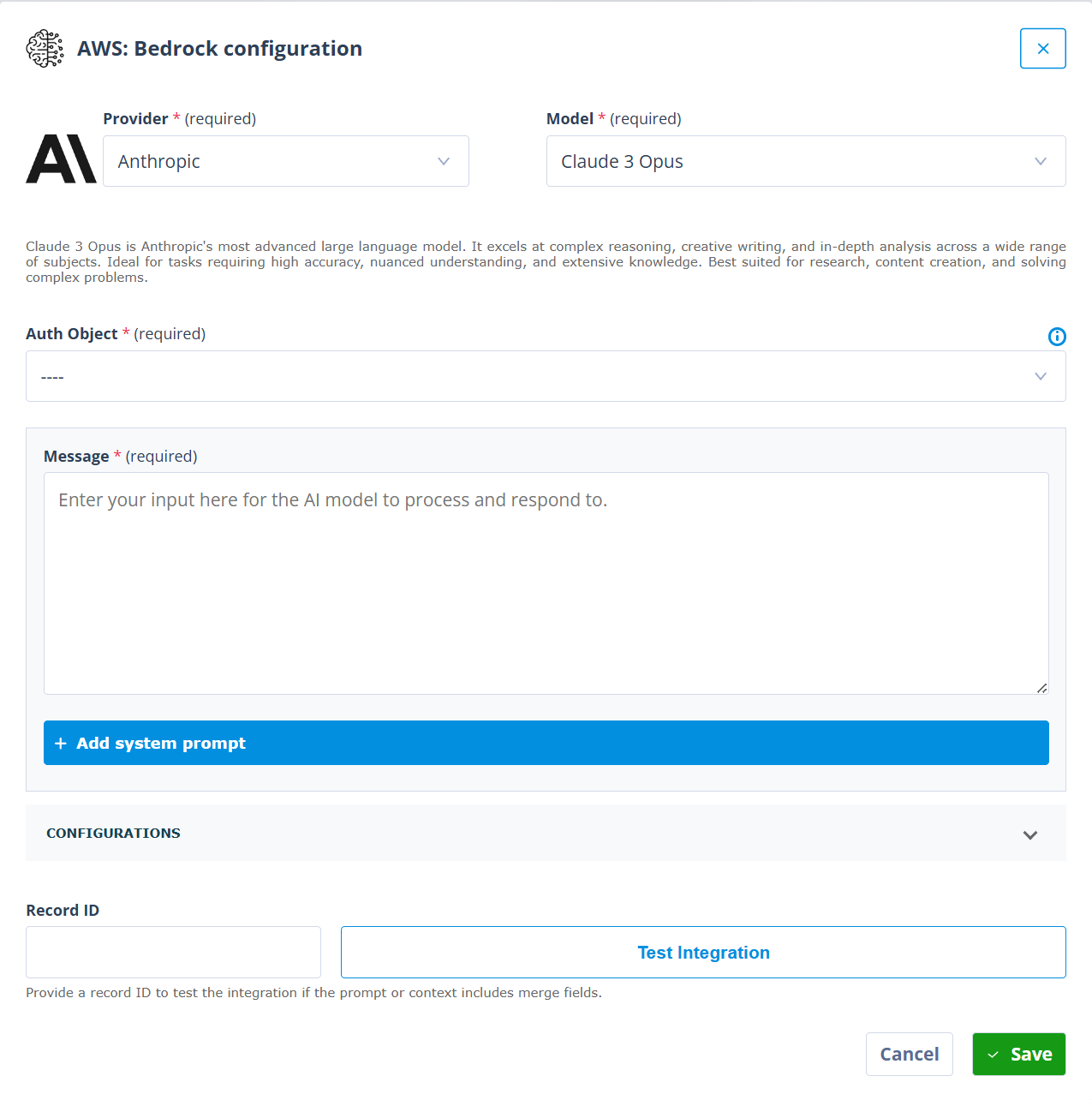
For example, the Bedrock actor may allow you to select:
- Provider: Anthropic
- Model: Claude 3.7 Sonnet or another available Claude model
Using Amazon models through AWS Bedrock
The Bedrock actor can also be used with Amazon model families where they are available in the customer’s AWS environment.
For example, the actor may allow you to select:
- Provider: Amazon
- Model: Nova Pro or another available Amazon model
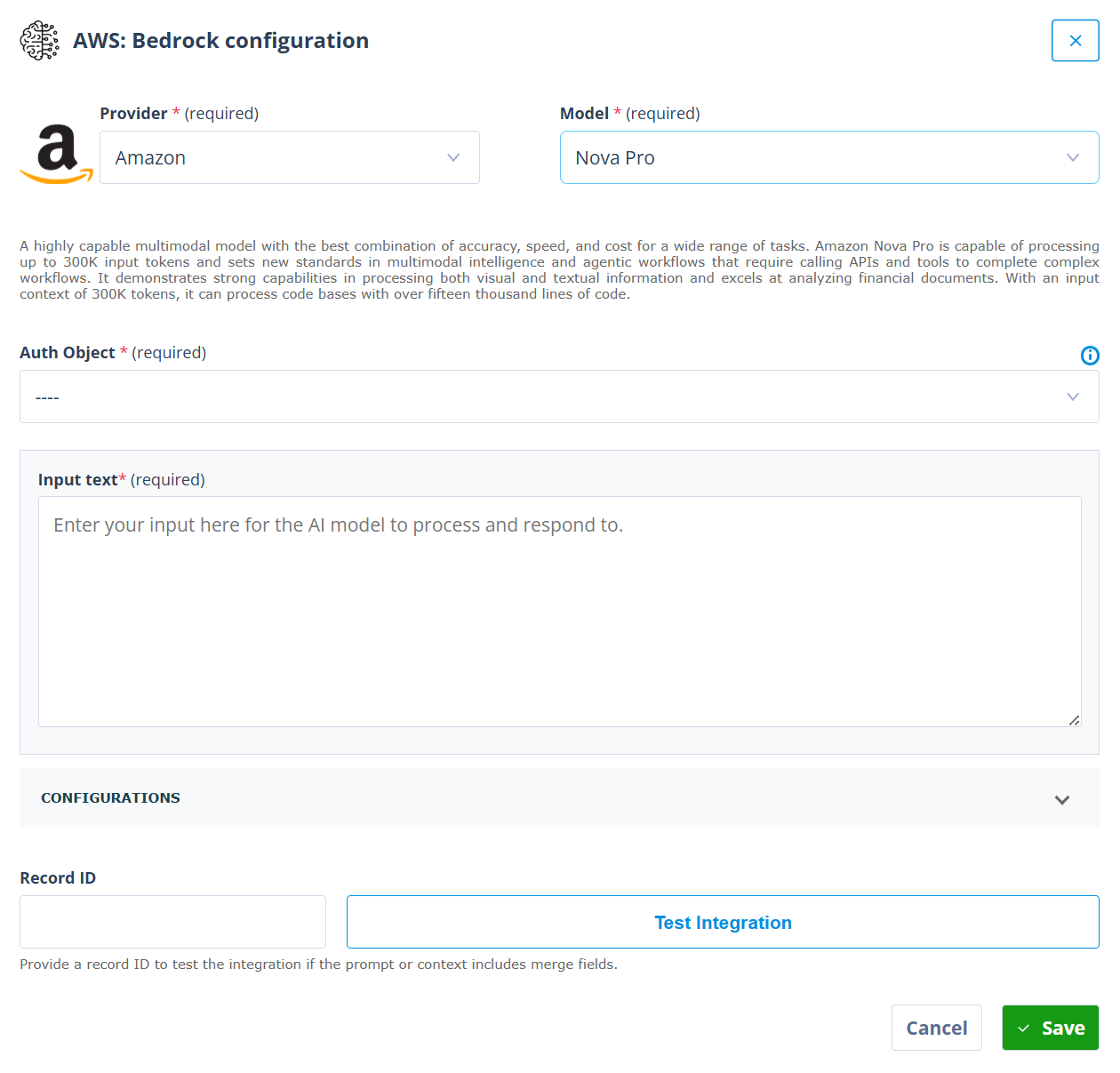
Amazon models may be useful where a customer wants to use AWS-native model options for summarisation, classification, drafting, extraction, multimodal processing, or other AI-supported workflow steps.
Bedrock Actor settings
The exact settings shown in the Bedrock actor can vary depending on the provider and model selected.
Common settings include:
Provider
Select the model provider.
The provider determines which group of models is available in the Model field. Different providers may expose different configuration options.
Model
Select the model that should process the request.
The model list depends on the selected provider, the customer’s AWS region, and the model access configured in AWS Bedrock.
Where available, the actor may display a description of the selected model to help explain what that model is commonly suited for. Use this as guidance, but choose the model based on the workflow goal, input type, expected output, performance requirements, cost profile, and customer AI policy.
Auth Object
Select the Authentication Object used to authenticate the request to AWS Bedrock.
The Authentication Object should be configured to use the customer’s approved AWS authentication approach. The exact setup depends on the customer’s AWS security model and the Autologyx integration configuration.
Message or input text
Use Message or Input text to provide the content that the model should process.
This can include static instructions, record data, extracted document text, email content, or a combination of text and Merge fields.
For example, a workflow might send a contract extract, matter description, inbound request, or document summary to the selected Bedrock model.
System prompt
Some provider and model combinations include a System prompt field.
Use the system prompt to guide the model’s behaviour, role, tone, constraints, or output format. This is usually where you describe the model’s task at a higher level.
For example, the system prompt might tell the model to:
- act as a legal intake triage assistant
- return only valid JSON
- classify the request using a fixed list of categories
- flag uncertain results for human review
- avoid making assumptions where the source text is unclear
Not every provider or model combination exposes the same prompt structure. Always check the modal for the model you are configuring.
Configurations
The Configurations section contains additional model-specific settings.
These settings may vary depending on the provider and model selected. Refer to the relevant AWS Bedrock documentation and the customer’s model configuration guidance before changing advanced settings.
Record ID and Test Integration
Where the message, input text, or system prompt includes merge fields, enter a Record ID before testing.
Use Test Integration to confirm that the actor can resolve the record data, call the selected Bedrock model, and return a usable response.
Testing is especially important where the actor is expected to return structured data for later workflow processing.
Preparing AWS Bedrock for use with Autologyx
Autologyx configuration teams do not usually configure the customer’s AWS account directly. However, it is useful to understand the general preparation steps that need to happen in AWS.
In principle, the customer or AWS administrator will need to:
- choose the AWS account and region where Bedrock will be used,
- confirm that Amazon Bedrock is available in that region,
- enable access to the required model providers and models,
- configure AWS identity and access controls for Bedrock use,
- create or approve the credentials or access method that Autologyx will use,
- confirm any customer policies for prompts, data sharing, logging, retention, and model use,
- provide the required authentication details for configuration in Autologyx,
- test the connection from the Bedrock actor before using it in production workflows.
Customers should refer to AWS documentation for the detailed Bedrock setup steps, including model access, supported regions, inference options, provider-specific configuration, and AWS security controls.
Choosing a Bedrock model
Different Bedrock models are suited to different tasks.
When choosing a model, consider:
- the type of input being sent
- the expected output format
- whether the task is summarisation, classification, extraction, drafting, reasoning, coding, or multimodal processing
- the size of the input
- the required response quality
- latency and cost
- regional availability
- customer policy requirements
- whether the output will be reviewed by a human
The model selected for a workflow should reflect the business task, not just the provider preference. For example, one model may be more appropriate for summarising long text, while another may be better suited to classification, structured extraction, or multimodal analysis.
Structured outputs and deterministic processing
Bedrock model responses are most useful in Autologyx when they can be brought back into the workflow as structured data.
Where possible, design prompts so the model returns a predictable structure. For example:
{
  "classification": "human_review",
  "summary": "The request appears to relate to a supplier contract review.",
  "recommended_next_step": "Create a legal review task",
  "confidence": "medium"
}
A structured response makes it easier for the Sequencer to apply deterministic checks.
For example, a Sequence can check whether classification matches an expected value before deciding which route to follow. If the response is missing, unexpected, or uncertain, the workflow can create a task for human review.
This pattern is particularly useful where Bedrock is being used to support triage, intake, contract review, document analysis, or other workflow decisions.
Important reminder about model outputs
Important reminder
Bedrock provides access to foundation models, but model responses are not deterministic in the same way as conventional workflow logic.
Prompt design, model choice, structured JSON, low-temperature or equivalent settings, validation rules, and deterministic Sequence logic can reduce risk, but they cannot absolutely guarantee that a model will always return a perfect, complete, or accurate response.
Where the model returns a specific structured value, the Sequencer can often apply deterministic checks to decide whether the value is acceptable. Where the model produces semantic output, such as a narrative summary, interpretation, or recommendation, customers should strongly consider human review before the output is used for important decisions, external communications, or final record updates.
Things to remember
- AWS Bedrock is the main route for using Anthropic Claude models in AI and the Sequencer.
- The Bedrock actor can support several provider and model combinations, depending on the customer’s AWS and Autologyx configuration.
- Provider and model availability varies by AWS region and changes over time.
- Customers should check AWS documentation and their AWS console for the latest model availability and setup requirements.
- Different providers and models may expose different configuration options.
- Use Test Integration with a representative record before relying on the actor in a live workflow.
- Prefer structured outputs where the response will drive routing, record updates, or task creation.
- Use human review where outputs are semantic, high impact, externally visible, or difficult to validate automatically.