
OpenAI
OpenAI services can be used in Autologyx workflows where a Sequence needs to send text, record data, document content, or structured prompts to an AI model and use the response later in the workflow.
OpenAI can be used through dedicated Autologyx actors for common OpenAI use cases, including ChatGPT-style prompts and embeddings. For more advanced use cases, OpenAI endpoints can also be called directly by using generic API actors.
This article explains the main OpenAI options available for AI and the Sequencer.
When to use OpenAI
Use OpenAI in a Sequence when you want to:
- summarise text, documents, emails, or records,
- classify inbound work,
- extract structured information from unstructured content,
- generate draft content for review,
- prepare data for downstream workflow routing,
- create embeddings for search, comparison, matching, or retrieval,
- call an OpenAI endpoint directly for an advanced or custom integration pattern.
The right approach depends on what the workflow needs to do and how much control you need over the OpenAI request.
Before you start
Before configuring OpenAI actors or API calls, check that:
- your Autologyx environment has the relevant OpenAI integration enabled,
- you have an OpenAI platform account where required,
- you can create and manage OpenAI API keys,
- you have an Authentication Object configured for the OpenAI API key,
- you have permission to edit the relevant Sequence.
OpenAI availability, models, and settings may vary by customer environment, subscription, enabled integrations, and tenant configuration.
OpenAI options in Autologyx
There are three main ways to use OpenAI with the Sequencer.
The ChatGPT Actor
The OpenAI: GPT or ChatGPT actor is used where a workflow needs to send a prompt to a chat model and use the model response inside the Sequence.
Typical uses include:
- summarising an email, document, or record,
- classifying work into a known category,
- extracting key information from text,
- drafting a response for human review,
- producing a JSON response that can be used by later Sequence steps.
The ChatGPT Actor is usually the best starting point where you want to use OpenAI for language understanding, drafting, classification, or summarisation inside a controlled workflow.
Configure the ChatGPT Actor
Add the actor to a Sequence in the same way as other Sequence actors.
- Go to System Configuration > Sequences.
- Open the Sequence you want to update.
- Find the OpenAI or ChatGPT actor in the relevant actor category.
- Drag the actor onto the Sequence canvas.
- Connect it to the appropriate trigger or workflow step.
- Open the actor configuration.
The exact labels available in your environment may depend on the integration version and enabled actors.
ChatGPT Actor settings
The ChatGPT Actor configuration modal allows you to define the model, authentication, prompt, context, temperature, and test record.
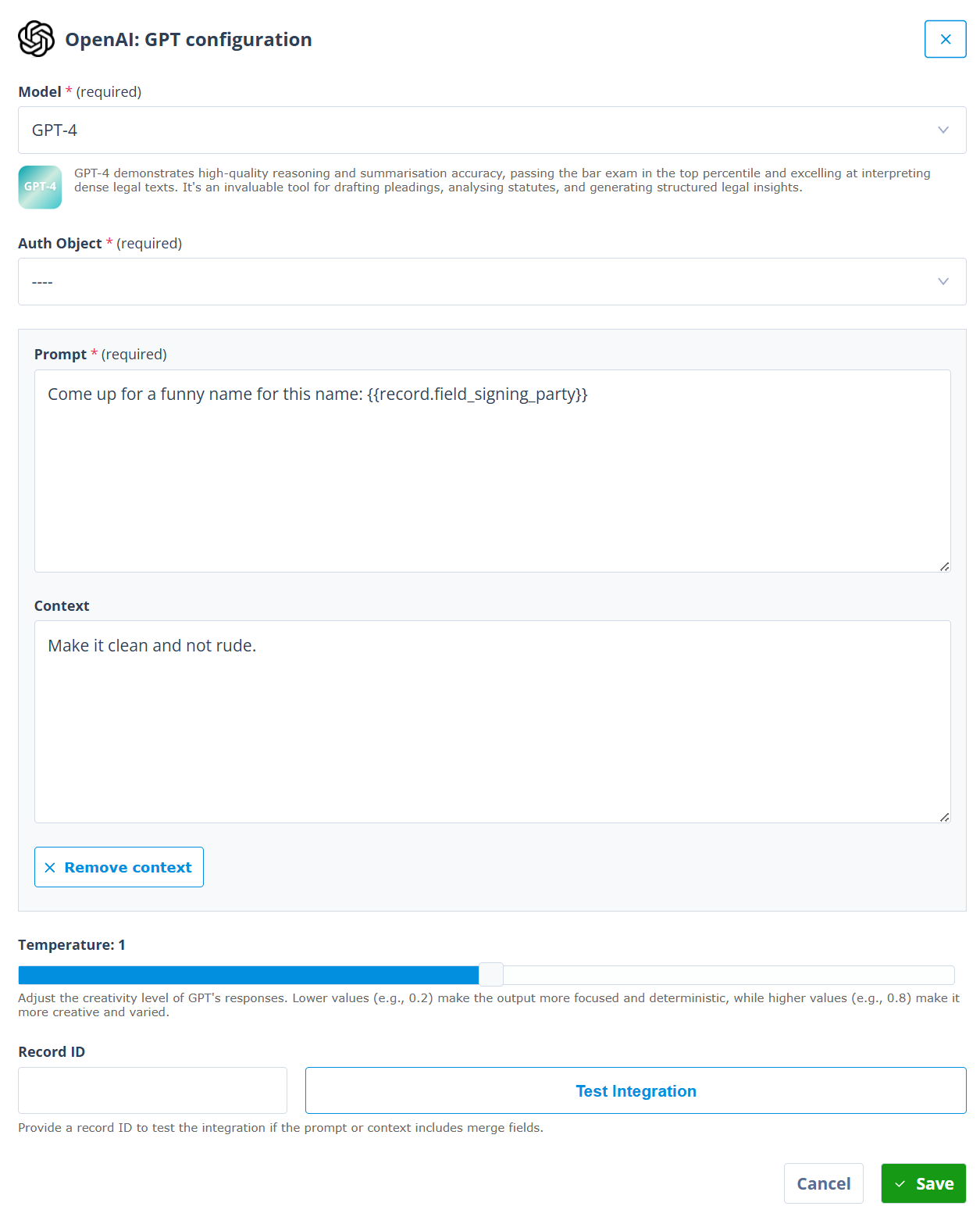
Model
Select the OpenAI chat model that the actor should use.
Where available, the modal may show a short description of the selected model to help explain what that model is commonly suited for. Use this as guidance, but choose the model based on the workflow goal, expected input size, response type, cost profile, and customer AI policy.
The available model list depends on the models enabled for your environment and OpenAI account.
Auth Object
Select the Authentication Object that contains the OpenAI API key.
This allows the Sequence to make the request without exposing the API key inside the actor configuration.
Prompt
The prompt is the main instruction that will be sent to the model.
A prompt can contain static text and Merge fields from the record being processed. This allows each request to be tailored to the specific Object Record in the workflow.
For example, a prompt could include the body of an inbound email, such as {{ record.field_email_body }}, so that the model can summarise or classify the content in the context of the current record.
Context
Context can be used to give the model additional guidance about how to respond.
Context is optional. Use it where the model needs additional instructions that should sit alongside the prompt. If the workflow does not need separate context, remove it and keep the prompt focused.
For example, the context might explain:
- the role the model should perform,
- the type of work being processed,
- the categories the model can choose from,
- the expected output format,
- when the model should flag something for human review.
For workflow use cases, context is often where you define guardrails for the response.
Temperature
Temperature controls how varied or creative the model response can be.
Lower values are usually better for workflow automation because they make the output more focused and consistent. Higher values may be useful for more creative drafting tasks, but they are usually less suitable where the response needs to be parsed or used by later deterministic workflow logic.
The modal guidance explains that lower values, such as 0.2, make responses more focused and more consistent, while higher values, such as 0.8, make responses more creative and varied.
Record ID and Test Integration
Where the prompt or context includes merge fields, enter a Record ID before testing. This allows the actor to resolve record-specific values during the test.
Use Test Integration to test the request before saving. This helps you check the request and response using real record data before relying on the actor in a live workflow.
Click Save to save the actor configuration. Remember to save the Sequence itself after updating the actor.
Use ChatGPT responses in the Sequence
The ChatGPT Actor response is most useful when it is stored or transformed into data that later Sequence steps can use.
Common patterns include:
- storing the response in a variable,
- extracting part of a JSON response,
- updating fields on the source record,
- creating a task for human review,
- sending the result into a document or message,
- using the response to decide the next workflow route.
For JSON responses, a Local Variable actor can be used to store or extract the content returned by the OpenAI actor.
For example, if the OpenAI response is returned in a chat-completion style structure, the message content may be accessed using a merge-field expression such as:
{{ output.choices.0.message.content }}The exact response path depends on the actor, endpoint, and response structure being used.
OpenAI Embedding Actors
OpenAI Embedding Actors are used to convert text into embeddings.
An embedding is a numerical representation of text. Embeddings can help workflows support search, similarity comparison, matching, retrieval, clustering, and other AI-assisted patterns where the system needs to compare the meaning of text rather than match exact words.
Use embedding actors where the workflow needs to:
- create a searchable representation of record text,
- compare one piece of text with another,
- support semantic search,
- prepare content for retrieval-augmented workflows,
- identify similar records, clauses, requests, or documents,
- store vector-ready output for downstream processing.
Embedding actors are different from ChatGPT-style actors. They do not generate a narrative answer. Their role is to create embeddings that another process can store, compare, or use later.
Configure an OpenAI Embedding Actor
The OpenAI embeddings configuration modal allows you to define the model, authentication, input text, output format, dimensions, and test record.
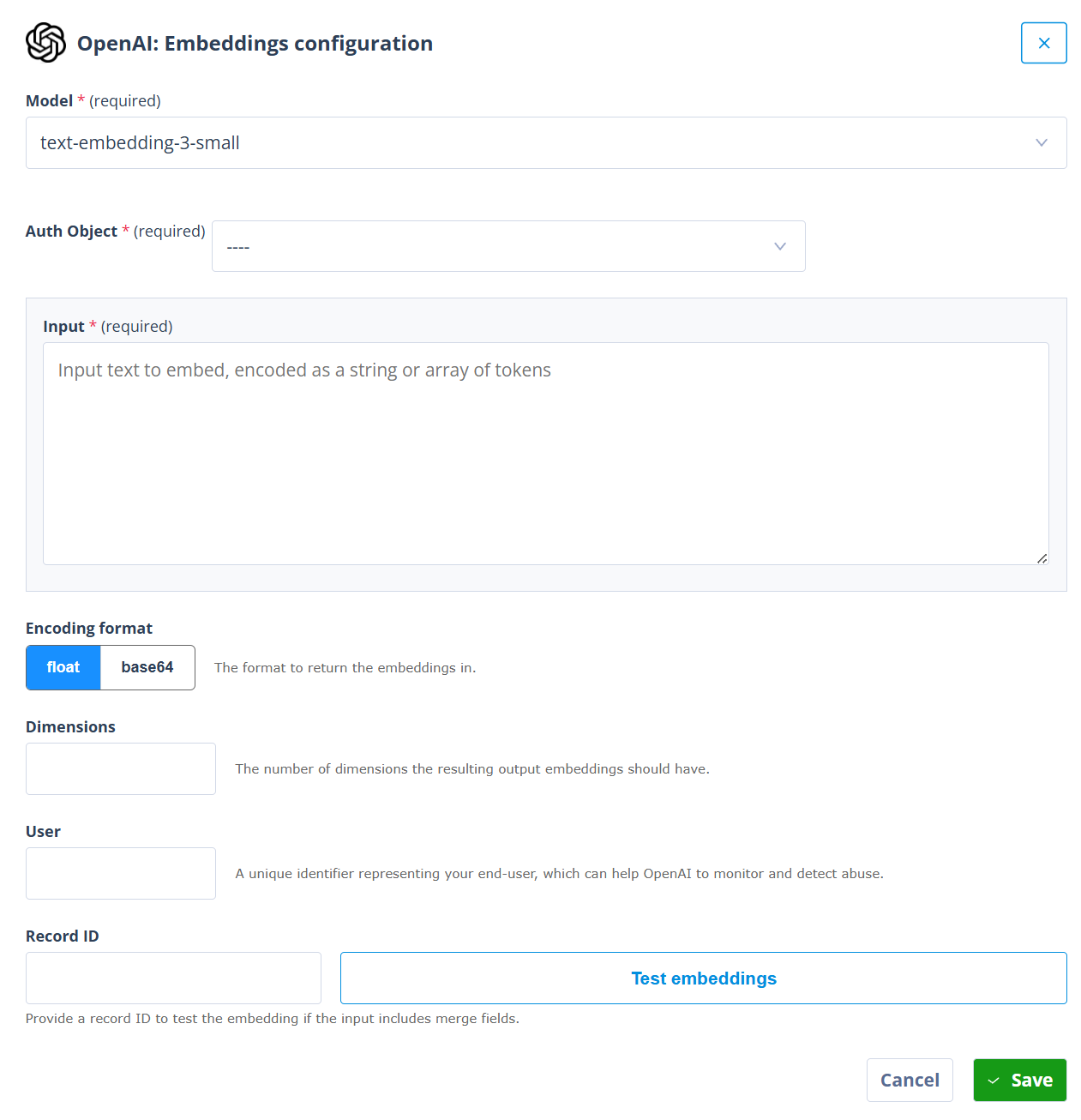
The available settings include:
Model
Select the embedding model to use.
The available model options depend on the OpenAI integration and tenant configuration. Confirm the exact model list in the target environment before publishing this page. Current OpenAI embedding configurations may include options such as:
text-embedding-3-small,text-embedding-3-large,text-embedding-ada-002, where legacy support is enabled.
Auth Object
Select the Authentication Object used to authenticate with OpenAI.
This should normally be the same OpenAI Authentication Object pattern used by other OpenAI actors.
Input
Enter the text that should be embedded.
This can be static text, record data, extracted document text, or a combination of text and merge fields.
For example, an embedding input might combine a matter description, request summary, document extract, or email body so that the resulting embedding represents the content that matters for search or comparison.
Encoding format
Choose the format used to return the embedding.
The modal supports:
- float,
- base64.
The correct choice depends on the downstream system or actor that will consume the embedding.
Dimensions
Use Dimensions where the selected model supports configurable embedding dimensions and the workflow requires a specific output size.
Leave this blank unless the downstream storage, comparison, or retrieval process requires a particular dimensionality.
User
The User field can be used to pass a unique identifier representing the end user.
This can help OpenAI monitor and detect abuse. Use this field only where it is appropriate for the customer’s governance and configuration approach.
Record ID
Use Record ID to test the embedding configuration where the input includes merge fields.
This lets you check that the actor can resolve the merge fields and generate an embedding for a real record before the Sequence is used in production.
Test embeddings
Use Test embeddings to test the configuration before saving.
Testing is especially important where the input uses merge fields, extracted text, or record-specific values.
Choosing between ChatGPT and embeddings
Use the ChatGPT Actor where you need the model to produce language or structured text output.
Use an Embedding Actor where you need a vector representation of text for later retrieval, search, comparison, or matching.
In simple terms:
- ChatGPT actors answer, summarise, classify, extract, or draft.
- Embedding actors represent text so it can be searched, compared, or retrieved by meaning.
A workflow can use both. For example, a Sequence might create embeddings for a document so that similar content can be found, then use a ChatGPT Actor to summarise the most relevant text for a user review step.
Making direct API calls to OpenAI
For more advanced OpenAI use cases, you can call OpenAI endpoints directly by using generic API actors.
This can be useful where:
- a native actor does not expose the OpenAI endpoint or option you need,
- you need a newer OpenAI API capability before a dedicated actor exists,
- you need precise control over request headers, body, or response handling,
- you want to use structured JSON outputs,
- you want to use tool-calling style patterns,
- you need to call a customer-controlled gateway in front of OpenAI,
- you want one Sequence pattern to support several AI providers or endpoints.
Generic API calls are more flexible, but they require more careful configuration. You need to define the endpoint, authentication, request body, content type, and response handling yourself.
For more information, see Making API calls to OpenAI.
JSON outputs and deterministic processing
OpenAI calls are often most useful in Autologyx when the response can be turned into structured data.
For example, a model might be asked to return JSON with fields such as:
{
  "classification": "human_review",
  "summary": "The email appears to request review of a supplier contract.",
  "recommended_next_step": "Create a legal review task",
  "confidence": "medium"
}
This can make it easier for the Sequence to apply deterministic checks after the model has responded.
For example, the Sequence can check whether classification is one of a known set of values before deciding what happens next. It can also send uncertain, incomplete, or unexpected responses to a human review task.
This approach is especially powerful when combined with:
- clear prompt instructions,
- constrained output schemas,
- validation logic,
- known allowed values,
- Local Variable actors,
- API response parsing,
- human review gates.
Important reminder about model outputs
Important reminder
OpenAI model responses are not deterministic in the same way as conventional workflow logic.
Prompt design, structured JSON, low temperature settings, validation rules, and deterministic Sequence logic can reduce risk, but they cannot absolutely guarantee that a model will always return a perfect, complete, or accurate response.
Where the model returns a specific structured value, the Sequencer can often apply deterministic checks to decide whether the value is acceptable. Where the model produces semantic output, such as a narrative summary, interpretation, or recommendation, customers should strongly consider human review before the output is used for important decisions, external communications, or final record updates.
Things to remember
- Use the ChatGPT Actor for summarisation, classification, extraction, drafting, and structured language outputs.
- Use OpenAI Embedding Actors where you need semantic search, comparison, matching, retrieval, or vector-based processing.
- Use generic API actors where you need direct access to OpenAI endpoints or more control than a native actor provides.
- Store or transform AI responses into structured values before using them in later workflow logic.
- Use deterministic validation where the response must match known options or schema requirements.
- Use human review where outputs are semantic, high impact, externally visible, or difficult to validate automatically.
- Confirm model availability, authentication, and integration settings in the customer environment before publishing or deploying the workflow.