
Service Accounts
Service Accounts are dedicated user accounts designed for integrations, API clients and automated processes.
Unlike standard user accounts, Service Accounts are not intended for individual users. They provide a secure identity for applications and services that need to authenticate with Catalyst without relying on a named person's credentials.
One of the main benefits of Service Accounts is that they continue to support username and password authentication even when Single Sign-on (SSO) is enabled and password-based authentication has been disabled for standard users. This allows integrations and automated processes to continue operating without affecting your organisation's authentication policy.
There are two Service Account types:
Internal and External Service Accounts
Internal Service Account
An Internal Service Account is intended for trusted internal integrations and automation.
Typical uses include:
- internal API integrations
- scheduled automation
- administration scripts
- automated user management
- managing User groups
- system-to-system communication
Internal Service Accounts automatically receive permissions equivalent to a Super Admin account.
Each Catalyst environment can contain one Internal Service Account.
External Service Accounts
External Service Accounts are designed for third-party integrations and external services.
Typical uses include:
- CRM integrations
- document management systems
- DocuSign webhook processing
- middleware platforms
- external API clients
Unlike Internal Service Accounts, External Service Accounts have no permissions by default.
You must explicitly grant any required Object Class or Record permissions, or assign the account to appropriate User groups.
Each Catalyst environment can contain up to five External Service Accounts.
Creating Service Accounts
Service Accounts can be created using the API.
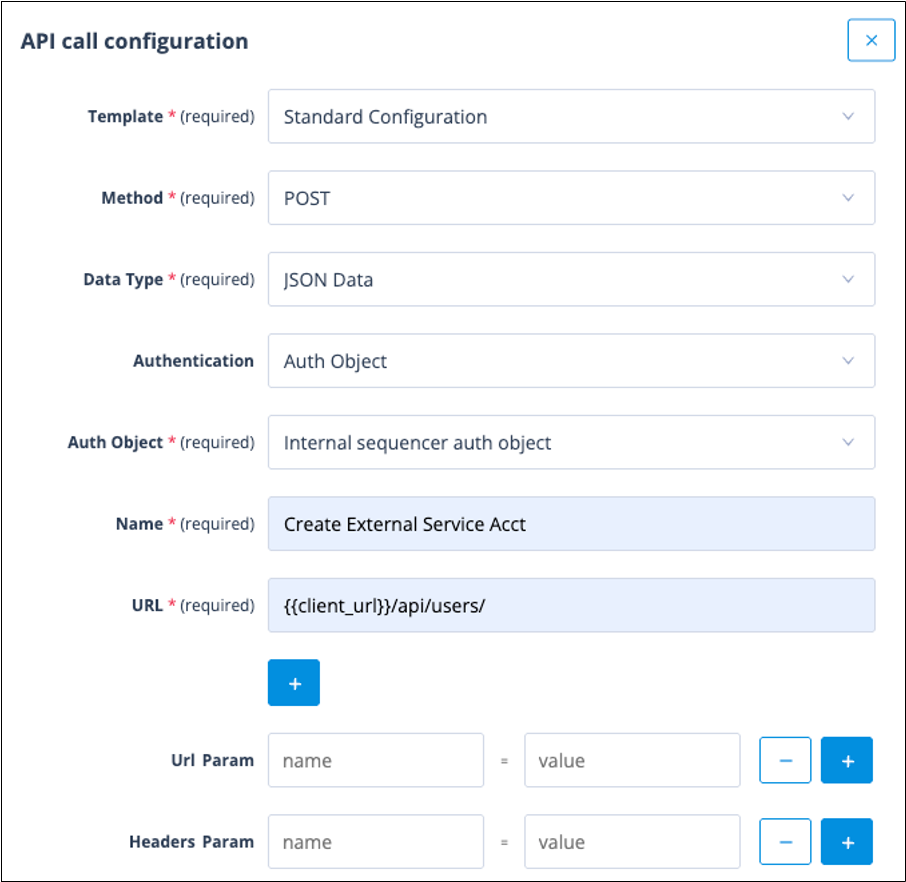
One simple approach is to temporarily configure an API Call actor in a Sequence.
Configure the API call as shown below.
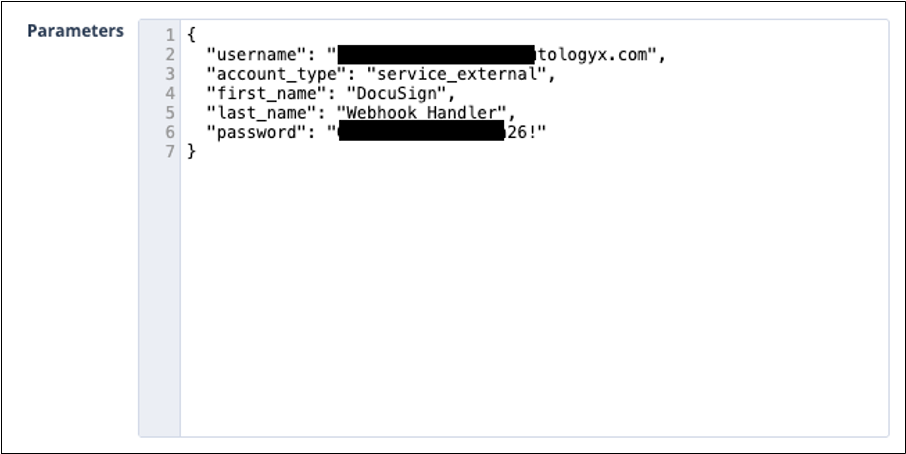
Use the following request body.
{
  "username": "[email address]",
  "account_type": "service_external",
  "first_name": "[first name]",
  "last_name": "[last name]",
  "password": "[password]"
}
To create an Internal Service Account, change the account type to:
"account_type": "service_internal"An example request is shown below.
Tip: You do not need to attach the API Call actor to a live Sequence. Simply configure the actor, test it against any record ID to execute the request, confirm that the Service Account has been created, then delete the actor if it is no longer required.
Alternatively, you can use any API client, such as Postman, to submit the same request.
Once created, the account appears in the Users list with the appropriate account type.

Password management
Service Accounts cannot use the Forgot your password option on the login page.
Only a Super Admin can reset or change the password of a Service Account.
Passwords can be updated using the following endpoint.
Endpoint
{{client_url}}/api/users/[userID]Request body
{
  "password": "[new password]"
}
Important: If you change the password of an Internal Service Account that is currently being used by an Authentication Object or integration, remember to update those credentials immediately. A Service Account cannot be used to change its own password.
Converting an existing Service Account
If you already have an integration account that you want to convert to one of the dedicated Service Account types, submit a PATCH request using one of the following request bodies.
External Service Account
{
  "account_type": "service_external"
}
Internal Service Account
{
  "account_type": "service_internal"
}
Things to remember
- Internal Service Accounts automatically receive Super Admin permissions.
- External Service Accounts have no permissions until they are explicitly assigned.
- Service Accounts always support username and password authentication, even when SSO is enforced for standard users.
- Newly created Service Accounts are automatically activated and never receive an activation email.
- There is no Resend activation email option for Service Accounts.
- Service Account passwords must satisfy your system's current password complexity requirements.
- Each Catalyst environment supports one Internal Service Account and up to five External Service Accounts.