
Editing an Element
Only users with a Super admin account type will have access to the list of Elements in order to edit one.
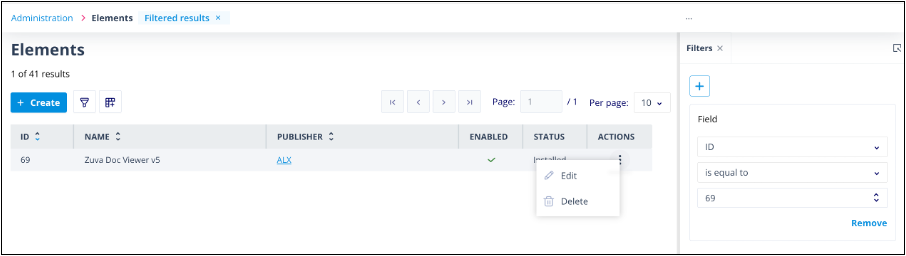
When you select Edit in the Actions menu, you are taken to the edit page for that Element.
Note: The fields in the Package Management section will be greyed out. These fields cannot be edited.
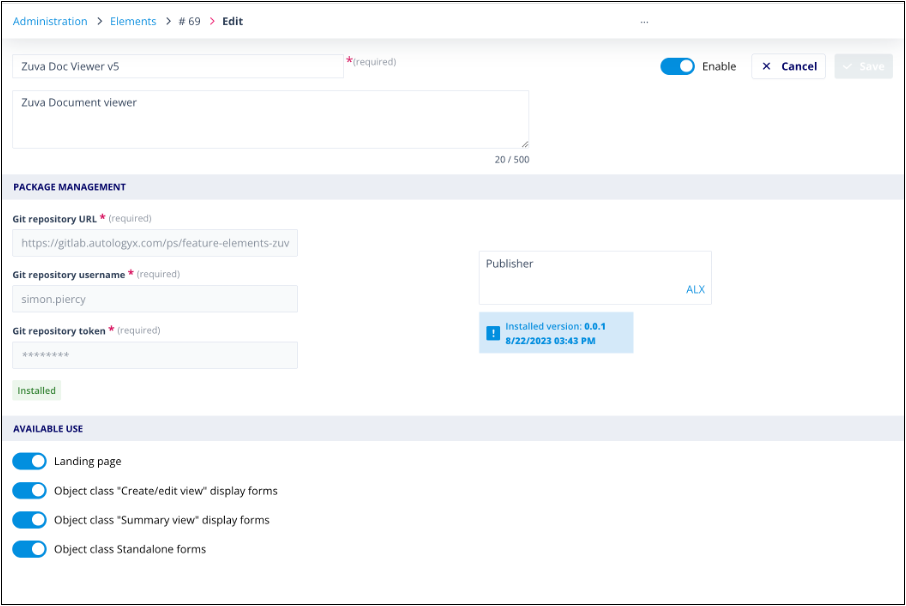
If you want to make any updates to the way the Element looks or works, this will have to be done in your config.json file or ccs file in your Git repository. You would then need to create a new Element for this updated version.
What you can edit
You can edit the following:
- Element name - this can be changed but must continue to be a unique value in the context of Elements in your Catalyst system.
- Description - add or amend the description. This information is useful for users who have not been involved in the development or creation of the Element, as it can be used to provide a brief overview of the functions the Element provides.
- Available Use - you can change your selections as to where the Element is available for use on system forms. If you switch off availability, the Element will no longer appear in the Elements section of the side panel for that particular form.
- Disable/Enable - if you disable an Element, it will cease to appear on all possible forms. Remember, the Element will continue to count towards the total in your system unless you delete it.
Useful info
Coming soon: "Disable" will follow shortly as an option in the Actions menu so that you won't have to edit an Element in order to disable it.