
What happens if I remove a column that has a field which is used in conditional logic?
In the screenshot below, the section called Personal Details has 3 columns.
The third column includes a field called "How many dependents do you have?"
This field controls the logic that shows or hides the next section, titled "Dependents".
Removing a column
If you try to remove a column by reducing the number of columns from 3 to 2, an on-screen message will ask which column you want to remove.
You can clearly see that column 3 has the conditional logic icon, whereas columns 1 and 2 do not.
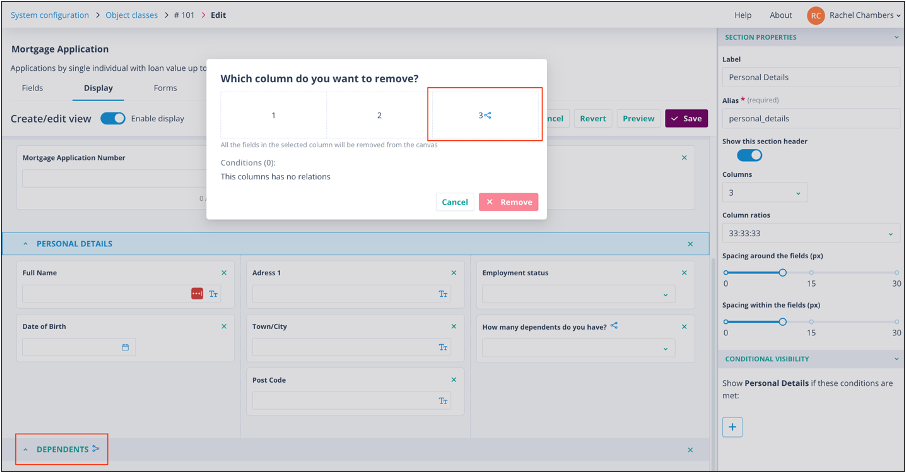
To continue, click the column you wish to remove. The display colour of the selected column will become blue.
If the column contains a field used in conditional logic
If the selected column contains a field with conditional logic, a second on-screen message will be shown.
This message tells you that all the fields in the selected column will be deleted. It also lists the sections that are conditionally displayed because of a selection or input into a field in that column.
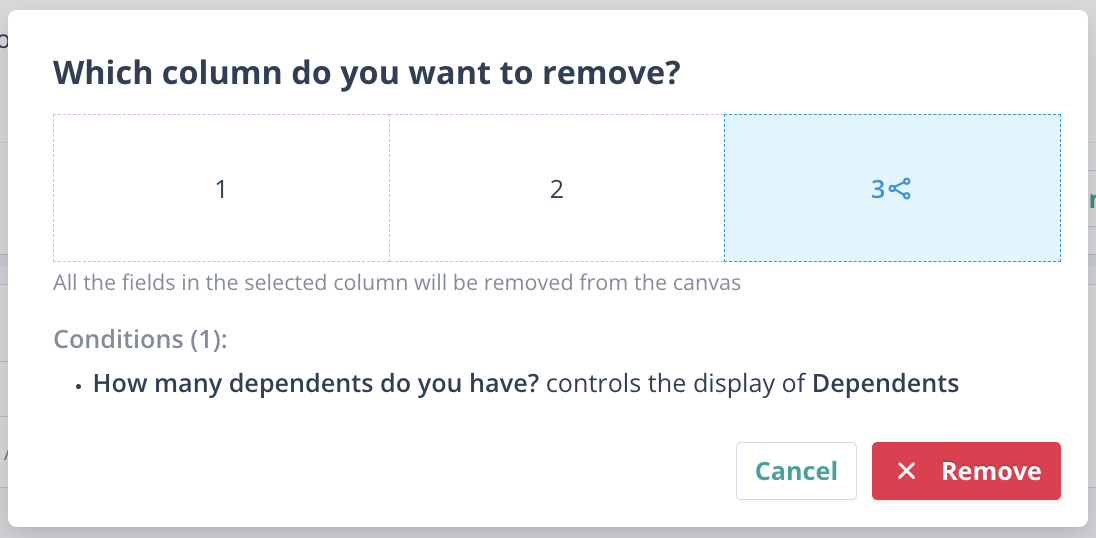
You can then choose one of the following options:
- Click Cancel to retain the column.
- Click Remove to delete the column and all related conditional logic.