
Users and groups visibility control
Balancing security with operational efficiency shouldn't feel like walking a tightrope. Our latest User Group Permission Sets update transforms this challenge into a strategic advantage.
Now you can manage precise user and group visibility across your entire platform through an intelligent permission system that adapts to your organisation's needs. This update ensures that the right users have access to the right information, helping you maintain both operational efficiency and strict compliance with privacy standards.
What are List permissions?
List permissions are essential for controlling who can see and select users and groups across the system. They are the foundation of user and group visibility across the platform. Without the appropriate permissions, users will not appear in selection fields, preventing unauthorised or unnecessary access to specific individuals or groups.
How are List permissions granted?
Permissions for viewing and listing users and groups are closely connected - when you have permission to view users or user groups, you automatically gain list permissions for those users and groups as well.
Importantly, being able to view a user group also enables you to list all members within that group, allowing for seamless selection and interaction wherever user or group visibility is required in the system.
List permissions can be granted through several mechanisms:
1. User Group Permission Sets
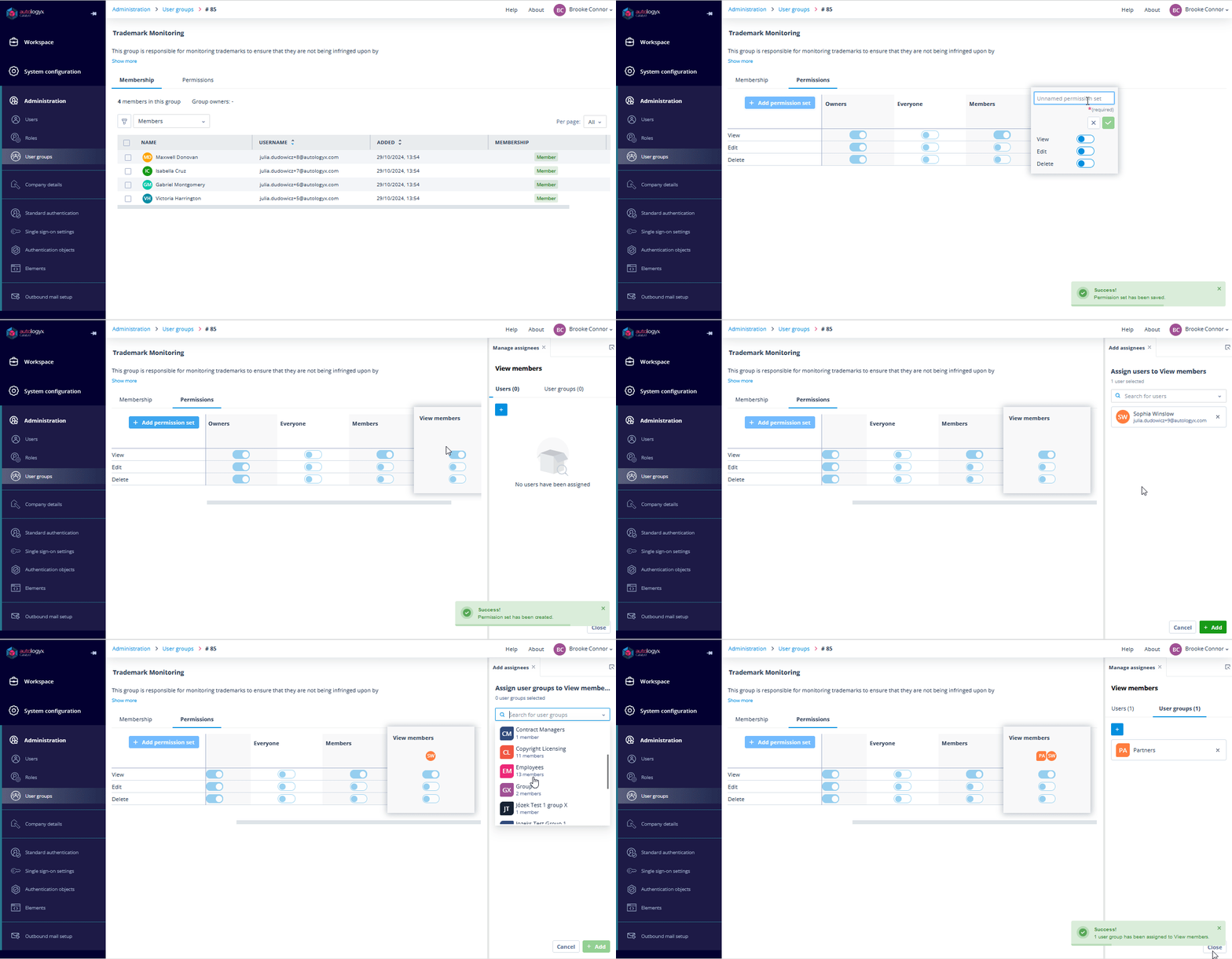
Each user group has predefined permission sets - Owners, Members, and Everyone - that determine who can view and interact with the group.
- Owners: Group owners have full permissions - view, edit, and delete - over the group. Importantly, these permissions cannot be modified for group owners. Owners will have full visibility into the group and can manage it completely.
- Members: This permission set applies to all members of the group. By default, "view" permission is set to true, meaning group members can see the group as a whole and list its other members in contexts like task assignments, default task assignees selection, or permission sets.
- Everyone: This set applies to all other users in the system who are not part of the group. By default, no permissions are granted, meaning that users outside the group cannot list any of the group members. This is crucial in industries like finance, where only authorised users should have access to specific groups, such as compliance officers or risk management teams.
- Custom Permission Sets: Custom Permission Sets can be created to provide more granular control over which users or departments can view specific groups or users. For instance, a legal department might need visibility into compliance groups, while HR can be restricted from viewing sensitive case-related groups.
2. API (for Config Admins)
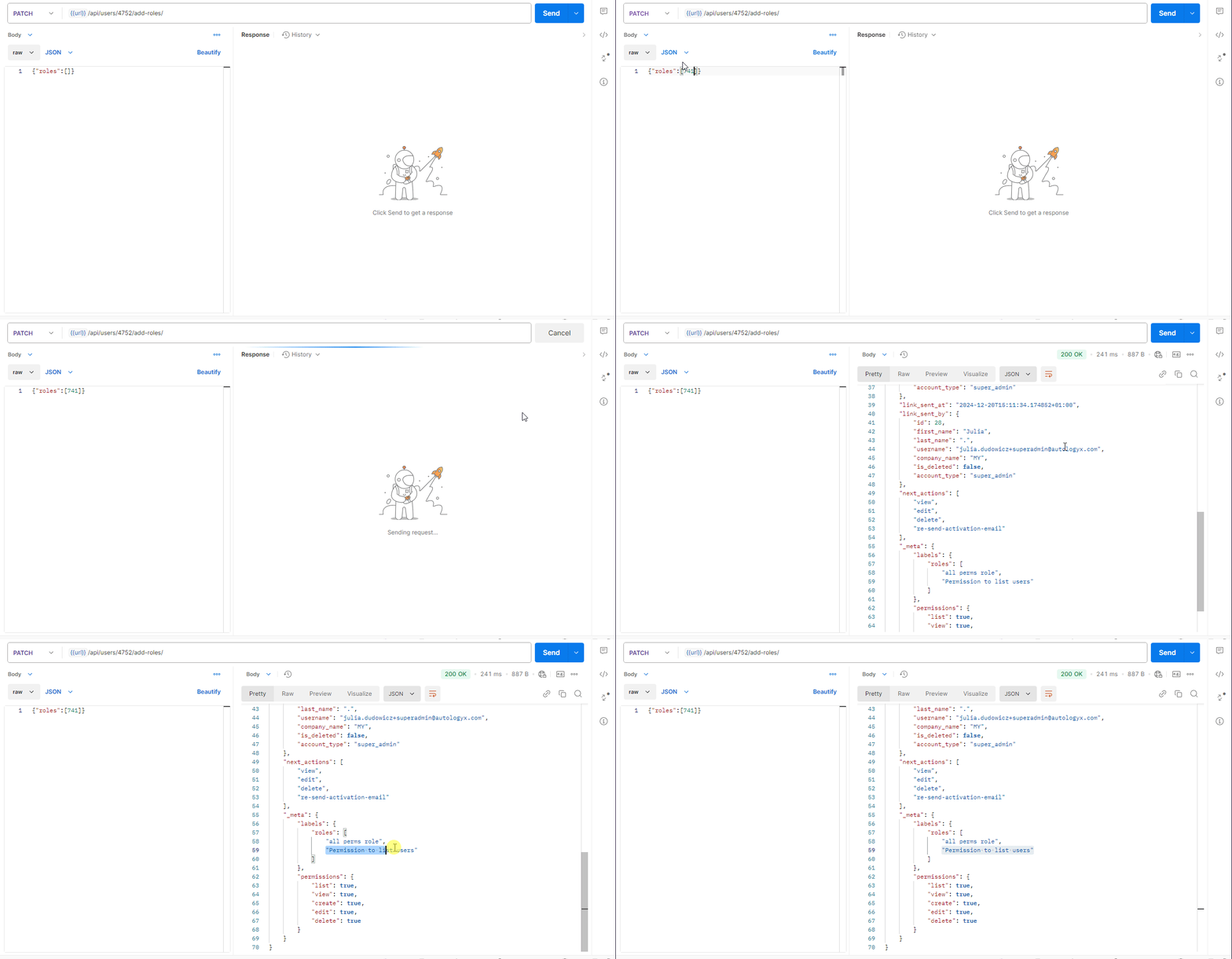
Config Admins can be granted the users.list permission exclusively through the API by a dedicated role. This role enables them to list and view all users across the system, even if those users are not part of their assigned groups.
For large companies, this API-based permission ensures that trusted administrators can manage user visibility on a global scale, while regular users remain restricted to their specific groups.
3. Super Admins
These types of users have full list permissions throughout the platform. This ensures that system-wide administrators maintain comprehensive oversight and manage users and permissions effectively.
Visibility for One-Time Completion (1TC) Accounts
A key addition to this update is the handling of One-Time Completion (1TC) Accounts. Users with 1TC accounts are crucial for specific workflows but cannot be assigned to any group. However, they need to remain visible for task assignments, filtering, and user-type fields.
Therefore, visibility of 1TC users is automatically granted to:
- Super Admins: Given their global visibility.
- Config Admins with the appropriate users.list permission via API.
This ensures seamless management of temporary or task-specific users while maintaining strict control over visibility.
Where do list permissions matter?
List permissions enable users to see and choose group members or groups in any part of the system where user and user group selection is available, such as:
- Task ownership and assignment
- Object Class and Record ownership
- Permission Sets (both Object Class and Record)
- User-Type Class fields
- Default task assignees in Sequences
- User Group management and Permission Sets
- Dropdown autocompletes and filters
Users will always have permission to list themselves. This ensures that every user can select themselves when needed, such as assigning themselves to a task, regardless of group or system permissions.
Summary
This new feature offers a significant leap forward in how user visibility is managed within the platform. By tying view and list permissions together, we've made it easier to enforce security protocols while maintaining the flexibility needed for complex workflows.
With more control over who can view, list, and assign users, you can now enforce tighter security protocols while maintaining flexible workflows. Experience how this intelligent permission system can protect your sensitive data while streamlining your team's daily operations - all through an intuitive, group-based control panel.