
Document & Records Enhancements
Improved "File name" display on tables and records
We’ve enhanced how documents are displayed across tables and records to make information clearer and more intuitive at a glance.
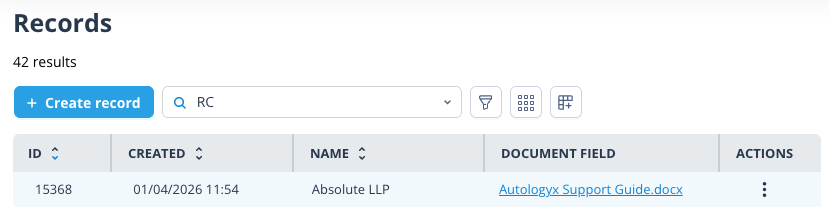
When a document field contains a single file, it will now display the actual file name instead of the generic “1 document”, making it easier to quickly identify content without additional clicks.
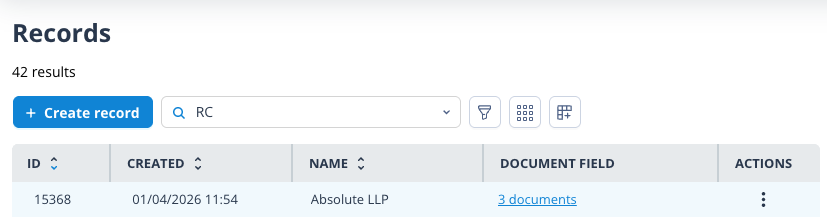
When multiple documents are present, the existing behaviour remains unchanged, continuing to display the total number of documents (eg “x documents”).
Filter Object records by document type fields
We’ve introduced new filtering capabilities to help you quickly find the records you need.
Available filter options
You can now filter record lists using document type fields, with the following options available:
- Is empty
- Is not empty
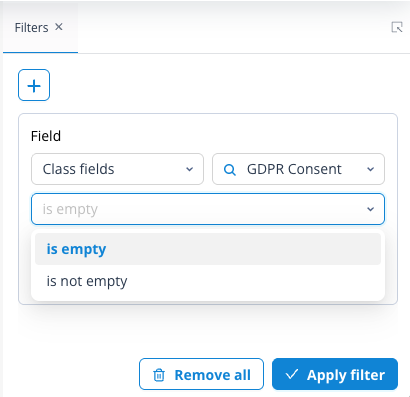
This makes it easy to identify records where documents are present, or highlight where key documents may be missing, helping you stay on top of your workflows.
API enhancement: file metadata endpoint
We’ve introduced a new API endpoint to streamline how file metadata is retrieved.
The endpoint
GET /api/object-records/files/?object_class=<object_class_id>&id__in=<id1>What this enables
Allows you to fetch metadata for up to 50 files in a single request, removing the need to call the record details endpoint for each file individually.
Example response structure
{
  "limit": 50,
  "offset": 0,
  "filtered_count": 21,
  "total_count": 21,
  "next": null,
  "previous": null,
  "results": [
    {
      "id": 71346,
      "name": "Attachment 2 Case-Specific Confidentiality Guidelines.pdf",
      "url": "https://catalyst-environment.autologyx.com/api/object-records/17829/files/278ad436-3187-4f38-862b-4xxxxxxxxxxx/",
      "size": "47910",
      "type": "application/pdf"
    },
    {...
    }
  ]
}
This enhancement not only provides richer insights into your files, but also significantly reduces the number of API calls required, making integrations faster and more efficient.