
Real-Time & Workflow Improvements
New context menu items in Sequencer
We’ve introduced new context menu options in Sequencer to make working with commonly used merge fields faster and more intuitive.
You can now easily insert the following merge fields directly into sequence objects such as Send Message actors, API calls, and Variables:
- Client: name and URL
- Date/Time: current date and current date/time
At runtime, each merge field is automatically replaced with its corresponding value:
{{client.name}}— the client’s name, as defined at system inception{{client.url}}— the client’s Catalyst system URL{{current_date}}— the current system date at the moment the sequence actor executes{{current_datetime}}— the current system date and time at the moment the sequence actor executes
| clipboard-202509261403-sn8eo.png | clipboard-202509261403-olypo.png |
Introduced new merge fields
We’ve expanded merge field capabilities to support more dynamic, loop-driven workflows.
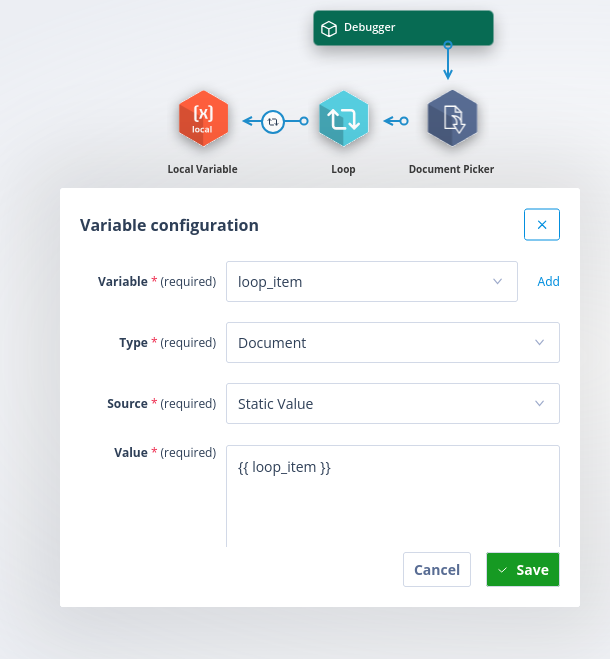
{{ loop_item }} support in Local Variables
You can now use the {{ loop_item }} merge field within Local Variables when using a Static value with a Document Type source. This allows you to reference and reuse document values dynamically within your workflows.
How this works:
- When a Local Variable uses a Static value containing
{{ loop_item }}, the system resolves it at runtime using the document from the current loop iteration - The resolved value represents the Document object and can be used in subsequent actors
- When multiple Loop actors are chained,
{{ loop_item }}resolves to the closest upstream loop context available at runtime - If used outside of a Loop actor, the value resolves to an empty string
- When testing via the Test Variable functionality,
{{ loop_item }}resolves using the document assigned to the current loop iteration
{{ loop_counter }} for loop-driven execution
We’ve also introduced the {{ loop_counter }} merge field to support loop-based sequencing.
This field:
- Represents the current iteration index (starting from 1)
- Available to all supported actors downstream of a Loop actor
This enables you to:
- Dynamically generate incremental values
- Append counters to filenames
- Create sequential identifiers
- Support ordering logic within loop-based automation
{{ loop_counter }} works alongside {{ loop_item }} and follows the same availability, resolution, and actor support rules.
Extended user-type merge fields to return User Group Members
We’ve enhanced merge field resolution for User-type Object Class fields, making it easier to work with User Groups in your automation.
Previously, the merge field
{{ record.field_user.meta.user_groups }}returned only metadata about groups (IDs, names, and member counts).
With this update, you can now access the full list of users within each group using:
{{ record.field_user.meta.user_groups[<index>].members }}Example response structure:
[
{
"id": 12,
"first_name": "Bridget",
"last_name": "Marquardt",
"username": "bridget.marquardt826@example.com
",
"company_name": "",
"phone": "16253372",
"mobile": "27363737"
},
{
"id": 591,
"first_name": "Abelardo",
"last_name": "Gutkowski",
"username": "abelardo.gutkowski752@example.com
",
"company_name": "",
"phone": "76235342",
"mobile": "93833722"
}
]
The merge field can be used where standard record-based merge fields are supported, eg Send Message actor, document templates, Local Variable, API Call, etc.
This enhancement allows you to dynamically reference users within selected groups, enabling more powerful and flexible automation, messaging, and document generation.
Real-time updates for Task Lists using WebSockets
We’re laying the groundwork for a more responsive, real-time experience across the platform.
As part of this, we’ve introduced a new back-end API powered by WebSockets, enabling task state changes to be reflected instantly — without the need for a page refresh.
This enhancement paves the way for real-time updates across the Landing Page, Task List, and Task Panel, helping users stay up to date with the latest activity as it happens.
Watch this space — there’s more to come.