
Microsoft authentication object
Turn your data into insights and action with Catalyst's Microsoft integration. Access to your Microsoft account data is streamlined through the Authentication client credentials flow.
To harness the data from your Microsoft account, all it takes is the creation of an Authentication object. This object becomes a key part of any carefully crafted sequence utilising API calls.
Configuration
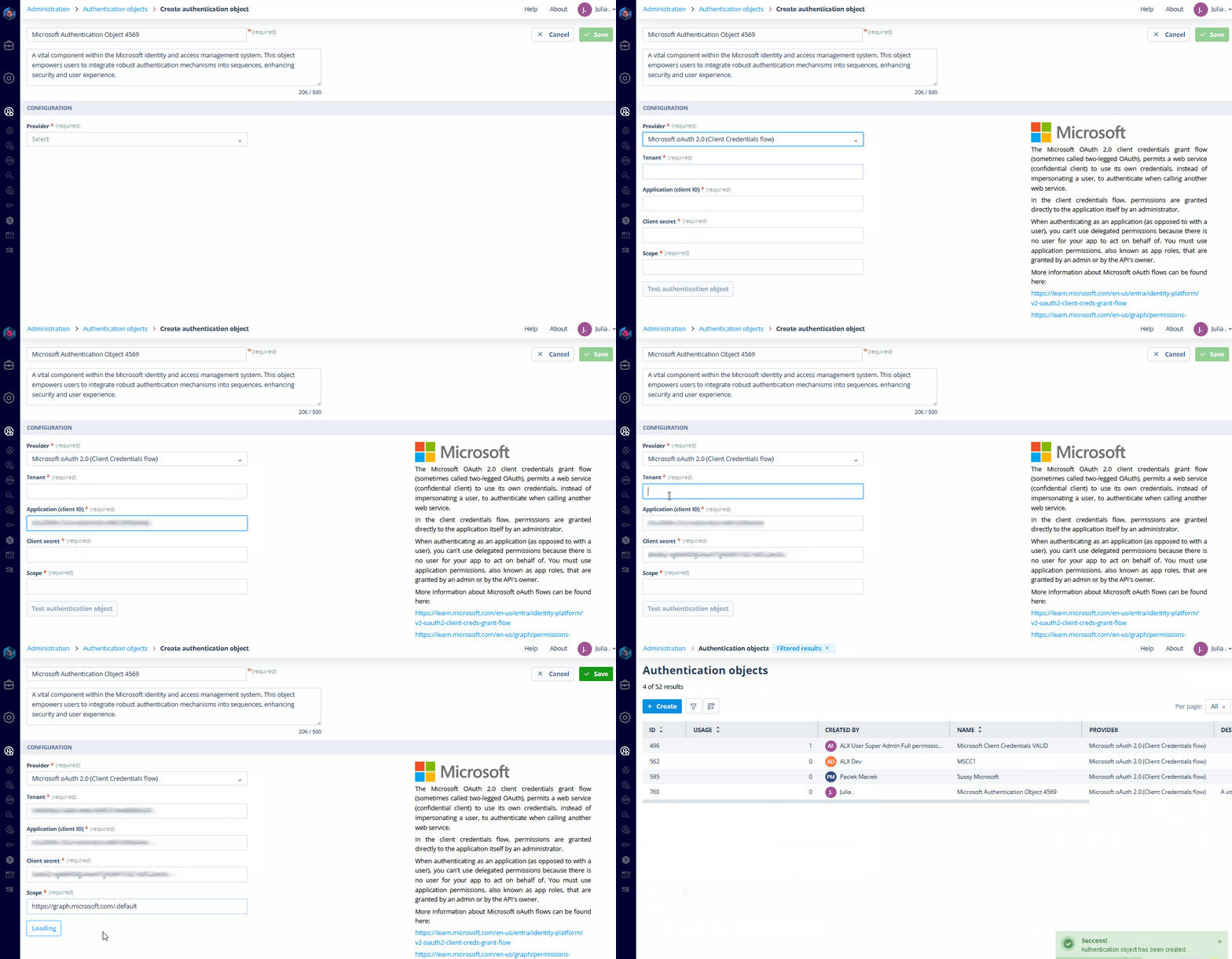
Set up the authentication object by selecting "Microsoft oAuth 2.0 (Client Credentials flow)" from the list of providers, then configure the fields required for authentication.
Required fields
- Tenant: the directory tenant from which you seek permission.
- Client ID: the application's Client ID.
- Client Secret: the client secret generated for your app in the app registration portal.
- Scope: the identifier (app ID URI) of the desired resource, suffixed with ".default." For example, if your resource is the Microsoft Graph, the scope would be https://graph.microsoft.com/.default.
Testing and usage
Test the Authentication object to ensure the input data is accurate before incorporating it into your sequences featuring Microsoft APIs.
From automating document workflows to enhancing collaboration, this integration opens up a world where data flows effortlessly, unencumbered by silos or barriers. Discover the power of Microsoft integration and take your digital environment to the next level!