
Syntax for merge fields
Object class fields can be merged into Document Templates, Send Message Actors, Local Variables and API calls. Document templates are created for specific Object classes, as are sequences which contain these actors. A Word .docx document forms the basis of a document template.
Fields from the Object class can be merged into the template so that it can be personalised for individual records.
Fields from any related Object classes can also be merged into the template.
The Word Add-in can be used to help configure your merge fields, IF Statements, if required, and other functions such as For or Group Statements.
However, if you don't have access to the Word Add-in, you can still create a comprehensive template by manually adding the merge fields. You just need to know the correct syntax for your merges.
Example relational model
As an example, the template for a Lease Agreement is to be created; the document template will be configured against the Lease object class. The relational model is shown below:
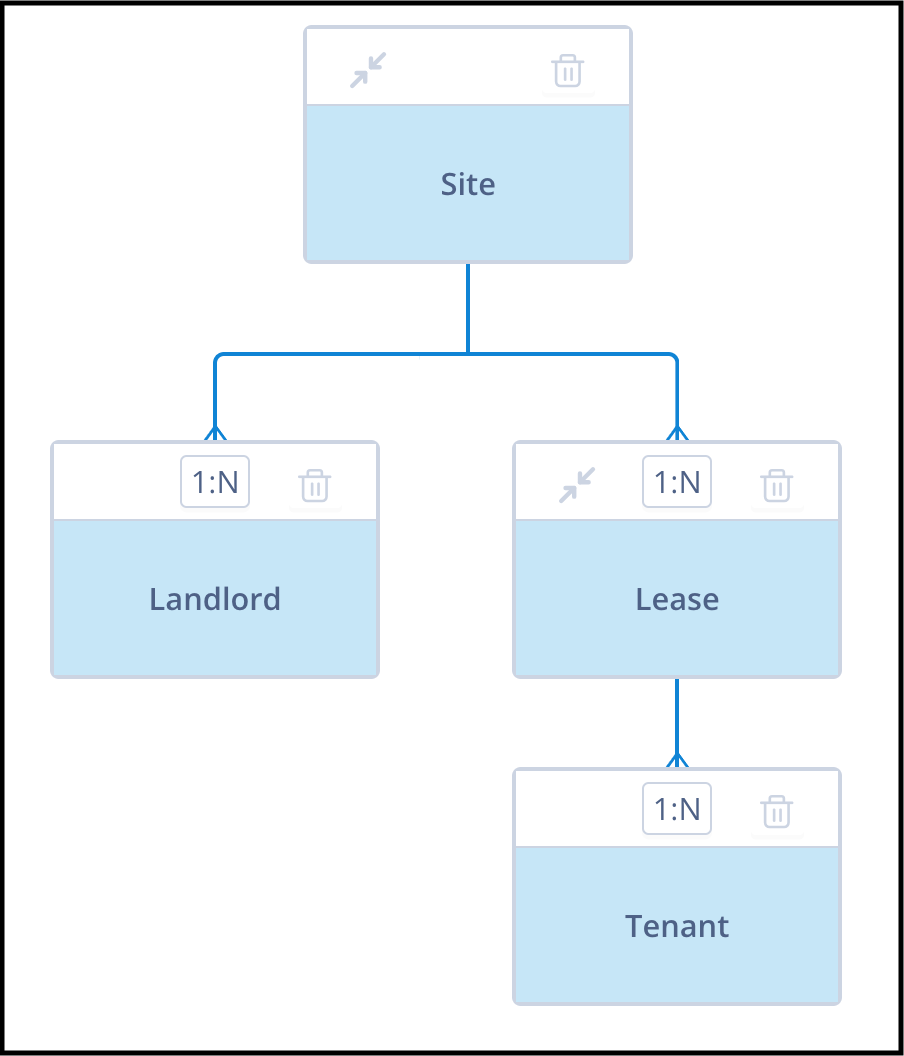
The model consists of the following Object classes:
- Site (parent) - object class ID 11
- Lease (child) - object class ID 14 - this is where the Lease document will be generated
- Landlord (child) - object class ID 51
- Tenant (grandchild) - object class ID 52
Merge field syntax examples
From object class Lease
When merging fields from object class Lease, these will take the following format:
{{record.field\_start\_date}}From object class Site
When merging fields from object class Site, which is the parent of Lease, the format will be slightly different:
{{record.related\_records\_11[0].field\_site\_name}}{{record.related\_records\_11[0].field\_site\_address}}From object class Tenant
This format is also used when merging fields from object class Tenant (a child of Lease):
{{record.related\_records\_52[0].field\_tenant\_first\_name}}{{record.related\_records\_52[0].field\_tenant\_last\_name}}From object class Landlord
However, when merging fields from object class Landlord, the following will be required as there is no direct link between Lease and Landlord:
{{record.related\_records\_11[0].related\_records\_51[0].field\_landlord\_contact\_first\_name}}{{record.related\_records\_11[0].related\_records\_51[0].field\_landlord\_contact\_last\_name}}How to read the syntax
In the relational merge fields, the [0] denotes the most recently related record. This is the index. You can see from the relational model that a Site can have more than one Lease and more than one Landlord, while a Lease can have more than one Tenant. The number preceding [0] is the object class ID.
Using a guard clause
Unless you are absolutely certain at the point of generating the document that all indexed related records are in place, you should make use of a guard clause in the form of an IF Statement wrapped around the merge field. This ensures that the process is not broken.
Example:
{%if record.related\_records\_11and
record.related_records_11[0].related_records_51
and
record.related_records_11[0].related_records_51[0].field_status == active%}
{{record.related\_records\_11[0].related\_records\_51[0].field\_landlord\_address }}{%else%}'Landlord absent'
{%endif%}Useful info
- Jinja2 is a templating engine used in Autologyx to dynamically generate content using data, logic, and expressions.
- The maximum number of parent/child levels for any relationship is 5. This limit is from the root parent (or top object class) down to the deepest descendent.
- The maximum number of child object classes another object class can have is 5.
- Fields from any object class in the relationship can be included in a document template created for any object class in the same relationship.
- A guard clause is also known as "existing checking" or "null checking".