
Invalid Actors and Best Practice
Introduction
Release 13.0 introduced an enhancement to the Sequencer: Actors with missing or invalid configuration now display a warning icon to indicate an issue.
For example, this can occur if an Actor depends on a field option that has been removed (such as a deleted single-select value).

Update Record actor which has not been configured
This change also introduced a breaking behaviour in some workflows.
Actors marked as Invalid Actors are no longer processed by the Sequencer.
In most cases, this prevents unintended failures. However, some users were intentionally relying on invalid Actors to achieve specific outcomes.
This best practice document outlines the two most common reasons this occurred and describes the recommended approach going forward.
1. Reducing Complex Triggers
Scenario
When sequencing, Triggers can become extremely complex, sometimes involving multiple layers of nesting and dozens of conditions.
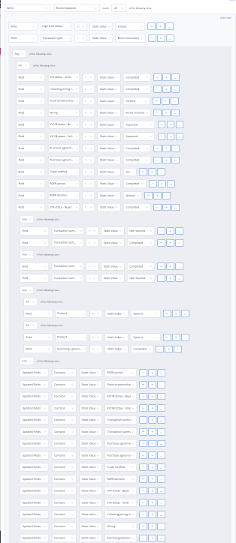
Example of a Trigger so large it only fits on screen at 25% zoom
In cases where parallel workflows merge into a final step, users often need to apply the same complex Trigger logic in multiple places.
When there is no risk of the workflow triggering twice (see below), manually recreating identical complex Triggers can be time-consuming and error-prone.
The old way
Previously, some users would intentionally use an invalid Update Record Actor as a “Holding Bay” or merge point.
All parallel workflow branches would feed into this Actor using a simple When Actor completed Trigger. From there, the user could define a single complex Trigger to handle all possible paths before continuing to the next step.
Because the Update Record Actor had no valid configuration, it effectively acted as a junction without making any changes to the record.
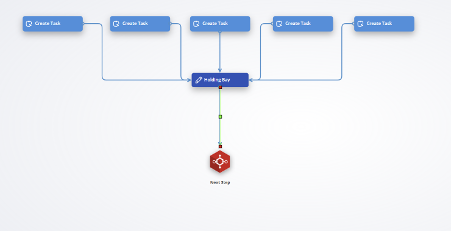
Best practice
Autologyx supports copying and pasting Triggers, which is the recommended approach when complex Trigger logic needs to be reused across multiple workflow branches.
To replicate an existing Trigger:
Right-click the configured Trigger
Select Copy Trigger
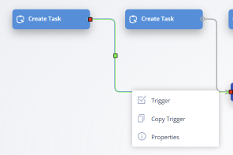
Copy trigger
Right-click the target (grey) Trigger
Select Paste Trigger
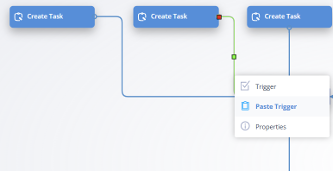
Paste trigger
This approach avoids manual errors when recreating large, nested conditions, saves time, and removes the need to rely on invalid Actors as workflow merge points.
Best practice rule
Keep Sequences small and modular wherever possible. Avoid introducing additional Actors when existing Trigger functionality, such as Copy/Paste, achieves the same outcome more cleanly.
2. Managing Race Conditions
Scenario
In sequencing, users sometimes build parallel workflow branches that must converge before the process can continue.
Common examples include:
- Finance, Legal, and Compliance must all approve a contract before it can be signed.
- KYC must approve a new client, and the Onboarding Team must upload a signed Letter of Engagement before the client can be created in the CRM.
- Multiple documents (e.g., 2–5) must be generated as part of a DocuSign envelope before it is sent.
In these cases, the workflows are dependent on each other and must synchronise at a specific point.
Unlike the scenario in 1. Reducing Complex Triggers, the merge step must ensure the next Actor is triggered only once. Otherwise, parallel completion can result in race conditions such as duplicate DocuSign envelopes, repeated CRM record creation, or other unintended side effects.
The old way
In some workflows, users would configure an invalid Update Record Actor as a central merge point for multiple parallel branches.
Each branch would feed into this “Holding Bay,” and the next Trigger would be designed to progress only once all parallel workflows had reached their required completion state (e.g., a Task completed, a document generated, or a field populated).
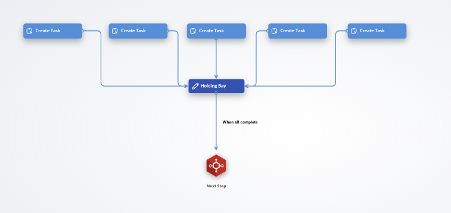
This pattern was intended to ensure that only the final completing branch would trigger the next step.
However, in practice, this approach could still result in race conditions and unintended duplicate execution.
Old way race conditions
This approach helps reduce duplication of downstream Actors, but it does not reliably prevent duplicate triggering. In certain timing scenarios, it can still introduce a race condition where the “next step” runs more than once.
This occurs because parallel branches are evaluated independently, and Actor execution is processed through a queue.
Example
In this example, two parallel processes (A and B) must both complete before triggering a single API call.
Each branch generates a document, puts it in a field, and then converges into a shared “Holding Bay” before progressing.
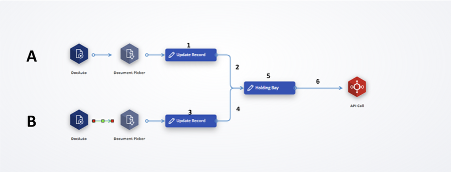
- Actors 1 and 3 populate the Document Fields
- Actor 5 is the empty “Holding Bay” merge point
- Trigger 6 checks that both Document Fields (1 and 3) are populated before progressing to the API call
Where the race condition occurs
Each Actor is processed as a separate item in the execution queue.
Once Actor 1 completes, Trigger 2 is evaluated. If satisfied, Actor 5 enters the queue—even if branch B has not yet reached the same point.
In the ideal sequence:
- Branch A reaches Trigger 6 first
- The condition fails because branch B is not complete
- Branch B reaches Trigger 6 second
- The condition passes, and the API call runs once
However, a race condition occurs if Actor 3 completes before branch A has had a chance to “fail” Trigger 6.
In that case:
- Branch A reaches Trigger 6 and now sees both documents present → it passes
- Branch B also reaches Trigger 6 and also sees both documents present → it passes again
- The result is that Trigger 6 fires multiple times, causing duplicate execution (e.g., multiple API calls)
Key takeaway
Even if parallel branches usually complete hours or days apart, any situation where one branch can finish before another branch has been evaluated creates a risk of duplicate triggering.
This is why invalid Actors cannot be used as a reliable synchronisation mechanism.
Best practice 1: Sequential Processing
The simplest way to avoid this type of race condition is to avoid parallel execution entirely.
If processes A and B run sequentially rather than in parallel, the workflow cannot reach the merge point twice, and the API call will only trigger once.
Below is the same example as above but configured as a single sequential flow instead of two parallel branches.
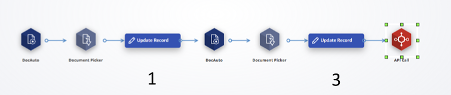
This is often the easiest and most reliable way to prevent duplicate execution within a Sequence. Even if steps 1 and 3 are conceptually independent, they do not always need to be implemented as parallel branches.
Best practice rule
Avoid unnecessary parallel processing. When possible, prefer sequential execution, as it is more reliable, easier to debug, and safer for workflows where downstream steps must run only once.
Best practice 2: Variables and Trigger Gates
Sequential processing is the simplest way to avoid race conditions, but it is not always practical. In some workflows, parallel execution is the more appropriate design, particularly when:
- Multiple manual interventions are independent
- For example, if two departments must approve a contract but neither depends on the other’s decision, forcing those approvals to happen one after the other can introduce unnecessary delays.
- Workflows include many conditional steps with multiple valid combinations
- For example, an onboarding process may require a variable set of documents depending on the customer: a Master Services Agreement, a Data Processing Agreement, a security questionnaire, or a regional compliance addendum. Any given customer may require only a subset of these documents.
- In these cases, enforcing a strict sequential order becomes difficult, since later documents may still be required even when earlier ones are not. The alternative—building Trigger logic for every possible combination of required documents—quickly becomes unscalable as more conditional steps are added.
In these situations, the recommended approach is to use Local Variables together with Trigger Gates. This allows parallel branches to run independently while still ensuring that downstream steps execute only once, after all required work is complete.
The overall structure will look similar to the previous “Holding Bay” pattern, but with two key changes:
- The merge point is replaced with a Local Variable “Gate”
- A Local Variable is initialised at the start, before splitting into parallel branches
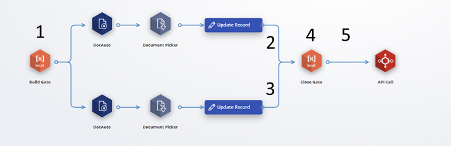
The numbered diagram below will be referenced throughout the next steps.
Step 1: Initialise the gate
First, initialise a Local Variable at the start of the Sequence (“Build Gate”). This variable will be referenced by Triggers 2 and 3, so it must exist before the workflow splits into parallel branches. Use an easy-to-understand flag to represent whether the workflow is still “open” or has already progressed. A Boolean is often the simplest choice, but any consistent value works. In this example, we use a String variable named gate, and set its initial value to “open”.
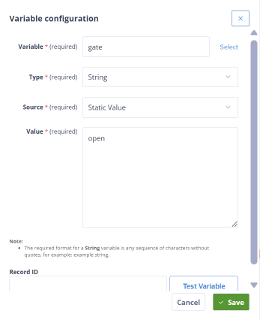
NB: The term “gate” is used here as a metaphor for “closing the door behind you.” There is nothing special about the name itself, as long as the logic is applied consistently.
Step 2: Configure the branch Triggers
Triggers 2 and 3 are identical. These Triggers control when each parallel branch is allowed to progress.
Each Trigger can include whatever business logic is required for that branch but must also reference the gate variable.
At minimum, the Trigger should check that the Local Variable gate contains the value open.
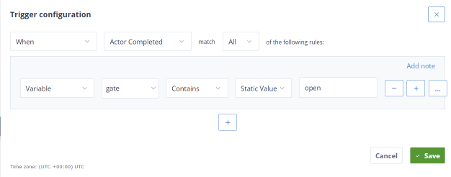
Step 3: Apply the same rule to every branch
Trigger 3 is configured in exactly the same way as Trigger 2.
This rule applies to all parallel branches in the Sequence. Whether there are two branches or many, every branch must reference the same gate variable.
Step 4: Close the gate when work is complete
Using the same Local Variable created in Step 1, the next step is to “close” the gate once the required parallel work has been completed.
In this example, we update the variable using Jinja logic to check that all expected documents are present in their respective fields. If the conditions are met, the gate is set to closed.
If the conditions are not yet met, the Variable remains open.
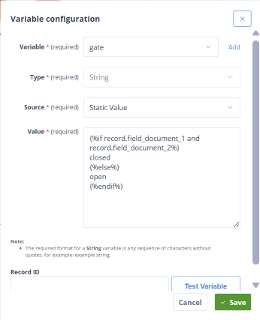
NB: Local Variables cannot directly reference Task completion. If your parallel branches end in Tasks, ensure that the Triggers leading into your gate already require those Tasks to be complete. In that case, the gate variable can be set directly to closed without additional Jinja logic.
Step 5: Trigger the downstream step only when closed
Finally, the Trigger leading out of the gate should reference the same Local Variable and ensure that it has been set to “closed”. Only once the gate is closed should the workflow progress to the downstream step, such as an API call.
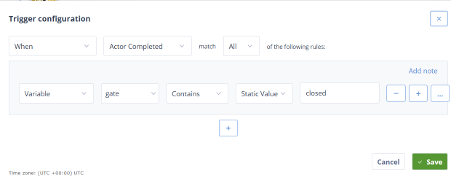
By following this pattern, we eliminate the race condition entirely. In the old approach, we relied on the assumption that only the final parallel branch could ever satisfy the merge Trigger. In practice, that assumption can fail due to queue timing.
With a gate variable in place, this risk is removed. The first branch to meet the completion conditions will progress, trigger the downstream step, and “close the gate” behind it. Any branch arriving shortly afterwards will still evaluate its Trigger but will find that the gate is no longer open and cannot progress.
As a reminder, the gate/door metaphor is for illustration only. In practice, this pattern is commonly implemented as an “all completed” flag, for example a Boolean that starts as false and is updated to true once all required work is complete. Whether you represent the state as true/false, open/closed, or 1/0 does not matter — consistency is what matters.
Best practice rule
Avoid relying on invalid Actors or timing assumptions to prevent duplicate execution. Where parallel branches must converge, use explicit gating via Local Variables and Triggers to ensure downstream steps run exactly once.