
Bug fixes and improvements
Behind every smooth workflow lies a collection of thoughtful improvements you might never notice, until they save you time, protect your data, or simply make everything work better. This update focuses on those essential refinements that strengthen the Catalyst platform from the ground up.
Trivy issues cleanup
We’ve completed a major sweep of security flags detected by Trivy, our vulnerability scanner, and resolved every actionable issue. From package-level risks to container image flags, we’ve tightened the hatches to ensure your data and infrastructure stay secure.
You won’t see it in the UI, but you’ll definitely feel the safety net.
Antivirus scanning for every upload
Now, every document uploaded into the system, by users or via integrations, goes through automated antivirus scanning. If it looks suspicious, it’s blocked. That applies across API uploads, UI interactions, and background processes.
There’s no manual step required. Just seamless protection, built in.
Constants available in Sequencer
Your constants - the small, reusable values stored directly in the database - are now fully usable inside the Sequencer via context menus. No more guesswork or manual typing.
Use constants in:
- API Call: URL, Parameters
- Local Variable: Value
- Send Message: Recipients, Subject, Message
- OpenAI GPT: Prompt, Context
- OpenAI Embeddings: Input
On execution, each constant’s value is injected automatically wherever it’s referenced. Clean, predictable, and incredibly useful for versioned endpoints, shared tokens, and consistent messaging.
Activity log hidden from External users
External-type users no longer have access to the Activity Log. Why? Because that log exposes the entire record history, including system-level and sensitive user actions.
Restricting this view helps protect workflows from overexposure and keeps sensitive interactions internal-only. Internal teams still see everything. External collaborators see only what they need.
Field IDs in the Class fields list
We now show the Field ID directly in the Class field list view. No need to open each field or go hunting in developer tools - just glance and grab.
It’s a small detail, but it means less clicking and more clarity when building dynamic workflows.
No limit in Document Picker
Previously, the Document Picker actor would only pass through the first five files - whether pulled from a field or via API response. That limit has now been removed.
You can now process as many documents as the field or source allows, opening the door to more powerful automation.
A word of caution
Catalyst still has built-in limits for the maximum number of documents in a field, and external services (like DocuSign, iManage, etc.) may also enforce file upload limits. Always test complex flows with large document sets before going live.
Testing improvements for Local Variables and API Calls
We’ve also extended our testing tools to cover two long-requested capabilities.
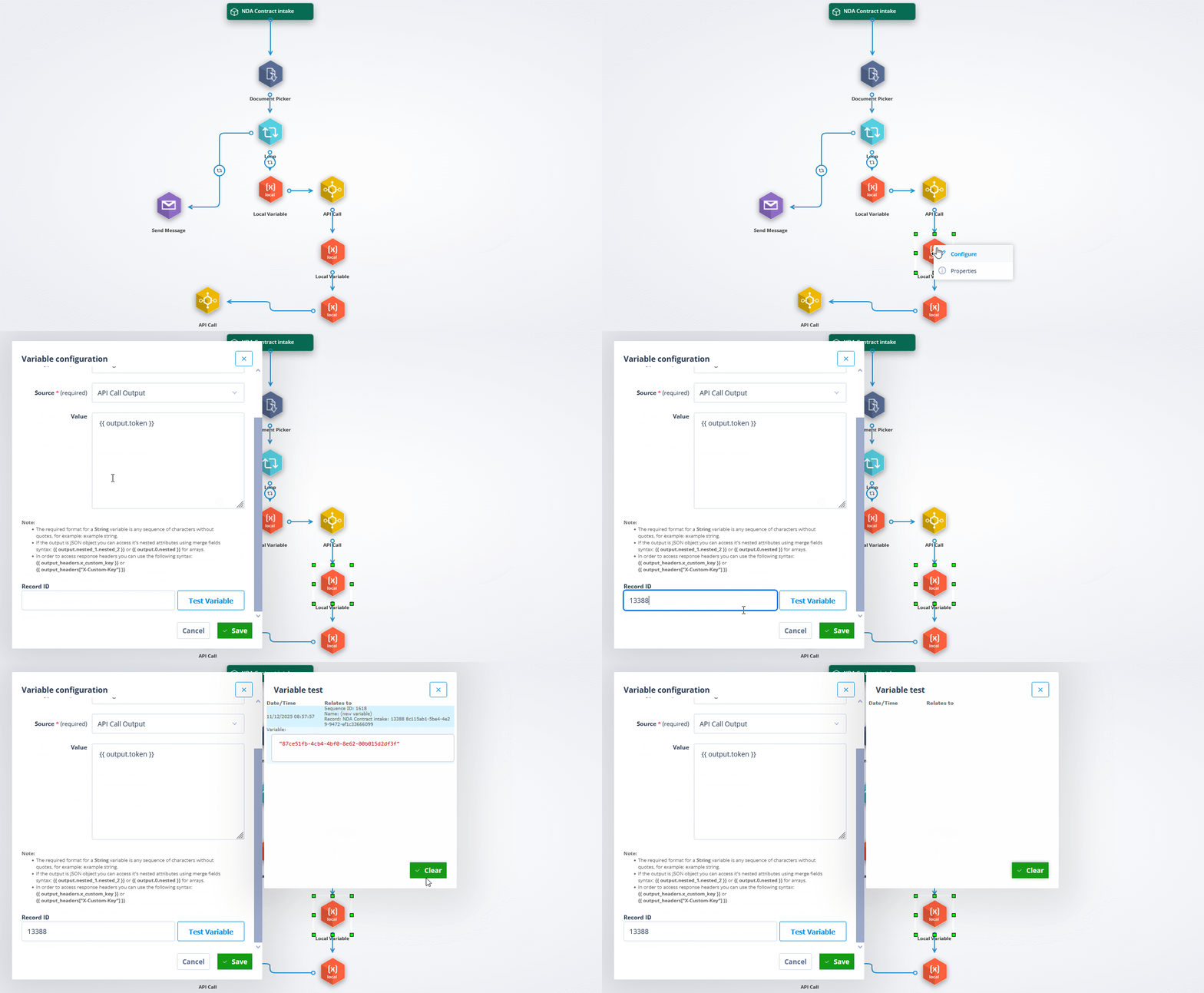
First: Local Variables are now fully testable inside the Sequencer, meaning you can finally preview their runtime values without running an entire flow.
Second: API Calls that rely on files can now be tested with real document inputs. In the testing section, you can select any document field from the object class and use one of its files as a sample upload. This lets you see exactly how your request will behave with real data - headers, payload, multipart structures, and all - before the sequence ever goes live.
Smarter error handling for Sequences
And finally, one of our favourite quality-of-life upgrades to date.
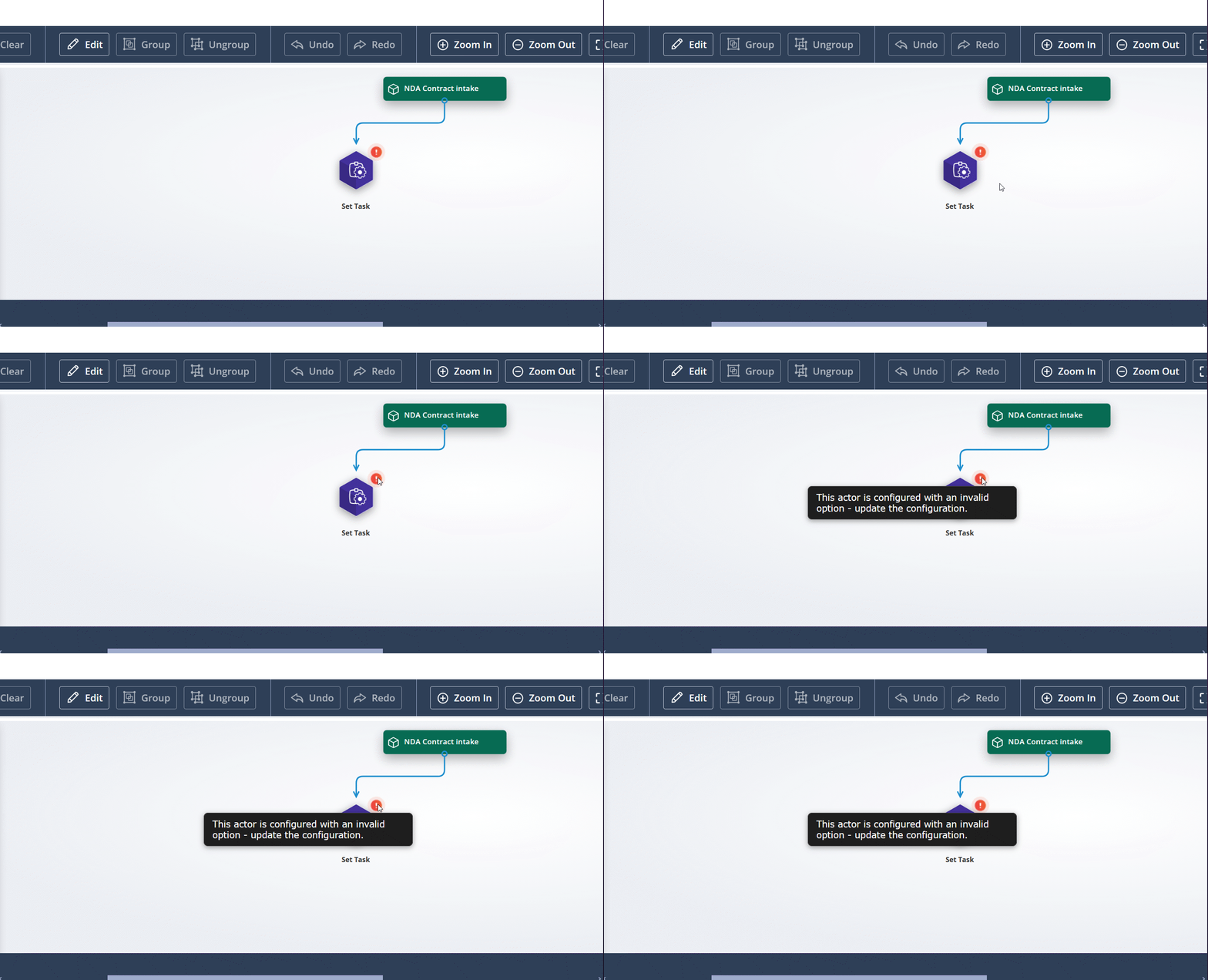
When a configured actor refers to a deleted or invalid resource (user, user group, permission set, etc.), the system now:
- Flags the actor in the Sequencer with a warning icon
- Highlights the broken field(s) in red when you open the configuration modal
- Clearly shows which option is missing or invalid
- Prevents saving until the issue is fixed
No more digging or silent failures. Especially useful for long, complex sequences with dozens of actors. Broken configs now jump out at you, right where they should.
Please read about Invalid Actors and Best Practice.
These updates represent our commitment to building a platform that grows more reliable and intuitive with each release. Your workflows now run on stronger foundations, with better security, clearer visibility, and fewer friction points standing between you and the automation you need.
Keep building, keep experimenting, and let us know how these improvements serve your projects.