
Understanding Namespace in Jinja2 for Document Templates
Author: Logan Oliver
Manage variables across loops and blocks in Autologyx Sequencer and Document Templates
What is a Namespace?
In Jinja2, namespaces allow you to keep track of variables across loops or blocks without losing their values. This is helpful in Autologyx for tasks like document templating and sequencer logic, where calculations or counters need to persist.
Why Use Namespace?
- Document templating – When merging fields and performing calculations across a list of items.
- Sequencer – Keeping a running total or condition across multiple loop iterations in API calls and local variables.
Examples
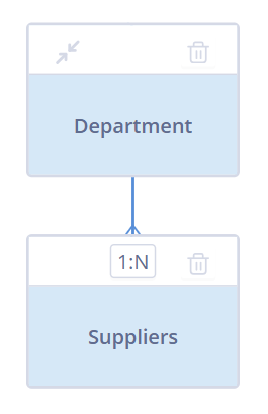
In our examples, we will use the above simple example relational model. Here, we have a parent object class for the various departments within a business, and child records for the suppliers that they engage. For reference:
Department: Object Class ID 1
Suppliers: Object Class ID 2
Set vs. Namespace
In this first example, we want check how many contracts across all of our suppliers are up for renewal within the next 30 days.
 The following example shows the limitations of
 set in Jinja2 when looping through this data.
Using set (Incorrect):
{% set total = 0 %}

{% for agreements in record.related_records_2 %}
  {% set total = total + agreements.field_number_of_contracts %}
{% endfor %}

{{ total }}
Why this doesn't work:
In Jinja2, using set inside a loop or block creates a new variable for each iteration. This means total resets every time, so the final output of the above code is 0, even though there are 29 contracts up for renewal.
Using namespace (Correct):
{% set calculation = namespace(total=0) %}

{% for agreements in record.related_records_2 %}
  {% set calculation.total = calculation.total + agreements.field_number_of_contracts %}
{% endfor %}

{{ calculation.total }}
Why this works:
The namespace creates an object that persists outside the loop. Each iteration updates calculation.total without resetting, resulting in the correct accumulated value of 29.
Adding Objects or Dictionaries to Namespace
Namespaces can also store more complex data, like dictionaries or lists. This is useful when you need to track multiple values or dynamically build objects during loops. For example, if you're creating a summary report that collects specific properties from items, you can use a dictionary within the namespace. In this example, we are trying to generate a list of data pertaining to documents within our child records.
{% set documents = namespace(documents_list=[]) %}

{% for doc in record.related_records_2 %}
  {% set new_entry = {
    'document_Id': doc.field_document_id,
    'name': doc.field_document_name,
    'document': doc.field_document[0]
  } %}

  {% set documents.documents_list = documents.documents_list + [new_entry] %}
{% endfor %}

{{ documents.documents_list }}
Expected output:
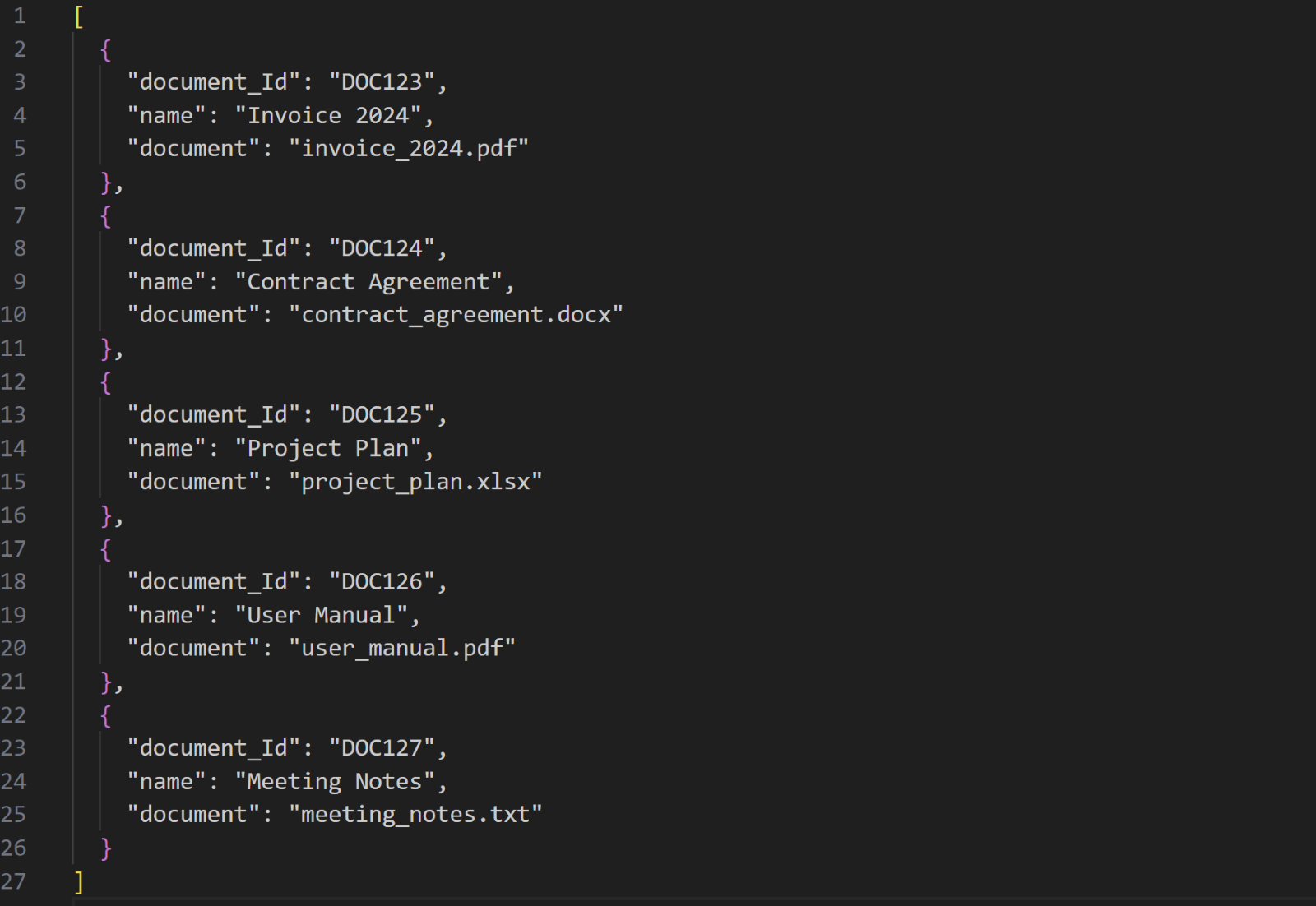
How this works:
This example demonstrates how to build a list of dictionaries within a Jinja2 loop using a namespace.
- Initialize the namespace:
A namespace is created with an empty list (documents_list) to store document entries. - Loop through records:
For each record inrelated_records_2, a new dictionary (new_entry) is created containing the document ID, name, and the first document within the document field.- NB: Remember to use Guard Clauses if you’re referencing an index! See here for more information.
- Add to the list:
Each dictionary (new_entry) is appended to thedocuments_list, preserving all previous entries by combining lists.- NB: You cannot use statements like “append” in Autologyx. You should always instead use a combination of “Set” and “+” when building lists in your namespace.
This technique is ideal for accumulating structured data, such as generating lists for reports or dynamic document generation.
Conclusion
Using namespace in Jinja2 provides a practical solution for managing variables that need to persist across loops or blocks. This is particularly valuable in Autologyx’s document templating and sequencer environments, where dynamic calculations or accumulations are required. By understanding the limitations of set and leveraging namespace, you can ensure more reliable and accurate outputs in your templates and processes. Additionally, storing objects or dictionaries within namespaces adds flexibility, enabling more complex data handling directly within Jinja2 templates.