
Relation Lookup Actor
What does the Relation Lookup actor do?
The Relation Lookup actor allows the sequencer to check through the associated parent or child records and identify those which match the given conditions configured within it.
When it has run, a list of parent or child records matching the Relation Lookup conditions is stored in the backend for further processing.
The Relation Lookup actor is quite often used with the Sequence Runner actor.
Having identified related parent or child records with the Relation Lookup actor, you can attach a Sequence Runner actor to run a sequence specifically for those records identified in the chosen parent or child object class.
How do I use the Relation Lookup actor?
Before you can use the Relation Lookup actor, your Catalyst system must have a relational model defined.
Find out more about the relational modeller and how to create one.
The relational model used for the purposes of this article is shown below.
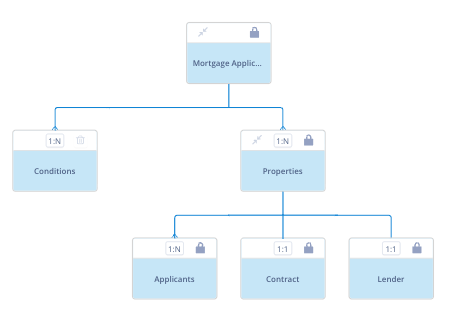
Click, drag and drop the Relation Lookup actor onto your sequence workspace at the point where it is appropriate to check related records.
Right click on the actor and select Configure. The Relation lookup configuration window will open.
Lookup options
The Lookup field has two options: Children and Parents.
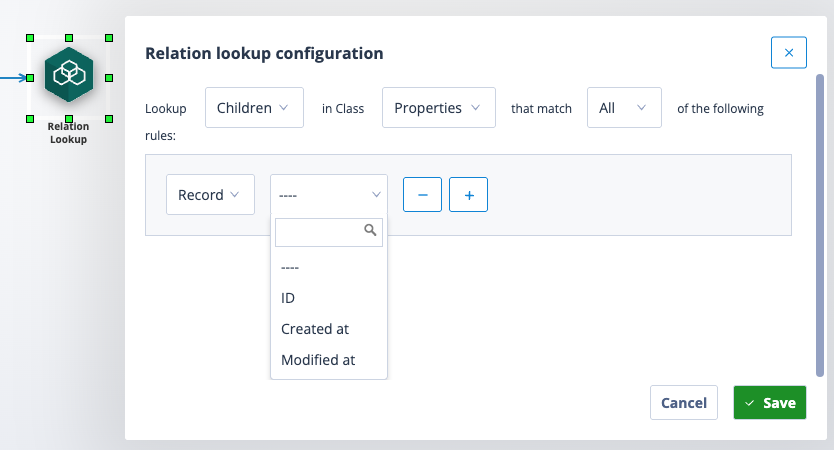
Make your lookup selection, but remember that you can only look up a parent object class if the sequencer's object class is a child, and you can only look up a child object class if the sequencer's object class is a parent.
| The sequence object class is "Mortgage Application". You will note that this object class is a parent but not a child in the relational model. Therefore, the Relation Lookup actor has a blank class field when Lookup Parents is selected. | Screenshot 2026-04-20 at 15.35.47.png |
Add conditions
Next, add any conditions about the records you want to reach.
| These can be about the Record | Screenshot 2026-04-20 at 15.09.49.png |
| And, or relating to field data | Screenshot 2026-04-20 at 15.10.38.png |
Complete the configuration and save.
Configure the trigger
Take a trigger from the Relation Lookup actor and connect it to the next sequence object; this can be any other sequence object but is often a Sequence Runner actor or even another Relation Lookup actor.
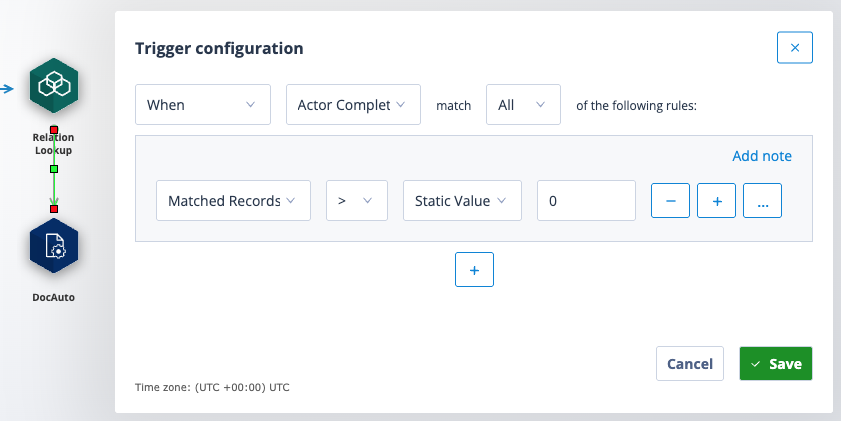
Right click on the trigger and select Trigger so that the Trigger configuration opens. You will note that the first field options includes "Matched Records".
The Relation Lookup actor does not automatically stop downstream workflow from processing just because the search returns 0 records. By using the Matched Records condition, you are able to ensure that pieces of workflow only progress when the correct number of records is matched. For example, if a Relation Lookup returned 0 children, but the trigger only referenced "When Actor Completed", a Sequence Runner actor following it would unnecessarily trigger and attempt to run against all records in the empty list.
However, if the subsequent actor is not a Sequence Runner (as with the example shown above), the impact is not solely one redundant actor activation. The Relation Lookup in this example successfully finds 0 records, but without Matched Records > 0 as a Trigger Condition, the DocAuto Actor will trigger regardless, leading to unintended document creation (or other further workflow).
| In this use case cascading Relation Lookup actors are being used to check the DocuSign Recipient's signing status. The Recipient (Seller) is a party in a Deal transaction. There are multiple Sellers who must sign the agreement. The overall Deal status is being set based on the value of all Sellers eg the status will only become "Completed" when every child record Seller has signed. We are using a combination of Matched Records > 0 and Matched Records = 0 to rule out each earlier status before confirming that everyone has signed. Dependent on the status, different onward processing is achieved with API calls. | image (3).pngimage (4).png |
| Here the first Relation Lookup actor is being used to determine whether the Deal relationship contains one or more Buyers. If one Buyer is present, the sequence will take the left hand route. The second Relation Lookup actor is checking the Seller records against which another sequence will be run. If more than one Buyer is present, the sequence will take the right hand route. | image (2).png |
Naming
As with all sequence actors, it is good practice to replace the default actor name with a label which is more meaningful and describes its purpose.
| Right click on the actor and select Properties. Enter the new label in the Name field and save. | Screenshot 2026-04-20 at 18.37.10.png |
| The new label will appear under the Relation Lookup actor. If the label is too long it will be truncated but can be viewed by hovering over the name. | Screenshot 2026-04-20 at 18.44.02.png |
Click for more information on using the Relation Lookup and Sequence Runner actors together.
Useful info
- The Relation Lookup actor configuration is limited to 3 conditions which cannot be nested. Therefore, this limits you to 3 x All or 3 x Any conditions. If a user needs to do more complex logic than the 3 allowed they would need to use a Local Variable and potentially an API Call to trigger children in very specific cases OR rather trigger all children and add the nesting logic into the "When Sequence Activated" trigger.
- An Autologyx Catalyst instance can have up to 1,000 sequences but there is no limit to the number of Relation Lookup actors you can use.