
Set Task Actor
What does the Set Task actor do?
The Set Task actor has two functions relating to task templates of the "Automatic" Task creation mechanism. It can be used to:
- Re-create a task which has already been created and completed
- Delete a task, irrespective of whether it is completed
How do I use the Set Task actor?
Click, drag and drop the Set Task actor onto your sequence workspace.
Right click on it and select Configure. The Set task configuration modal will open.
Select the task template
Click into the Search for task templates drop-down.
Available task templates will be displayed in alphabetical order by name.
"Available task templates" means those of the Update object record type which have been created for the sequence object class and those of the "Complete self contained form" type. The latter task templates are available for use in any object class sequence.
You can either scroll through the list or start typing to find the required task template.
Click on the template name, then select the required action.
Choose the action
Re-create - having selected this option the configuration is complete.
Save the configuration.
Delete - having selected this option a further field with 6 (single-select) options is presented.
The options are fairly self-explanatory but clearly only apply to the selected task template and the record which triggers this actor:
- All tasks - all tasks which have been created, irrespective of status, will be deleted
- All outstanding tasks - all incomplete tasks will be deleted
- All completed tasks - all completed tasks will be deleted
- Most recent task - the most recently created task, irrespective of status, will be deleted
- Most recent outstanding task - If the most recent task is completedthe condition will be ignored
- Most recent completed task - if the most recent task is outstandingthe condition will be ignored
Make your selection and save the configuration.
Rename the actor
As with all other sequence actors, it is best practice to replace the default actor name with something more descriptive or meaningful.
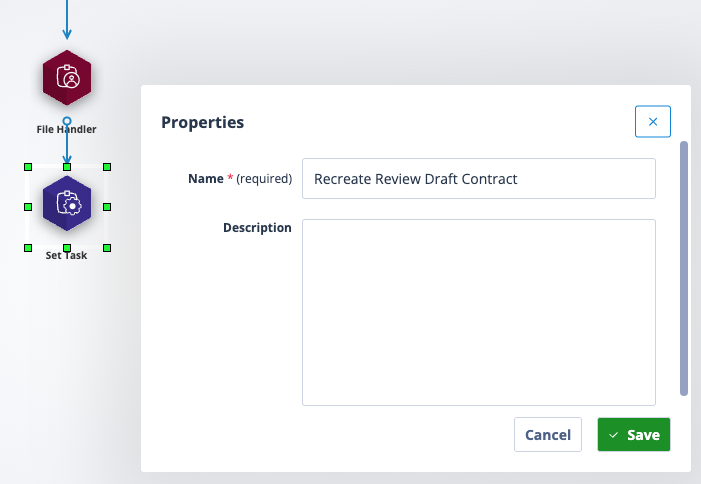
Right click on the actor and select Properties. Enter the new label in the Name field and save.
| The new label will appear under the Set Task actor. If the label is too long it will be truncated but can be viewed by hovering over the name. | Screenshot 2026-04-15 at 19.47.36.png |
When the Set Task actor has completed, the new task is created. This will trigger any onward processing where the original Create Task outgoing trigger is "When Task Created".
Useful info
A Set Task actor will normally be preceded by a Task Assignment actor and can be followed by any other sequence actor. However, it is most common that a Set Task actor does not have any object following it as the sequence will pick up from the original Create Task actor.