
Task Assignment Actor
What does the Task Assignment actor do?
The Task Assignment actor is used before a Create Task or Set Task actor to allow the selection of a user to be the Task Owner or Users to become Task Assignees. It is designed to ensure that tasks are efficiently directed to the appropriate individuals or teams.
The Task Owner or any Task Assignee can complete the task.
Depending on whatever other class or record permissions you may have set up, you can restrict task completion to only users who are made the owner or an assignee of a task via this actor.
How do I use the Task Assignment actor?
Click, drag and drop the Task Assignment actor onto your sequence workspace.
Right click on the Task Assignment actor and select Configure. The Task Assignment Configuration window will open.
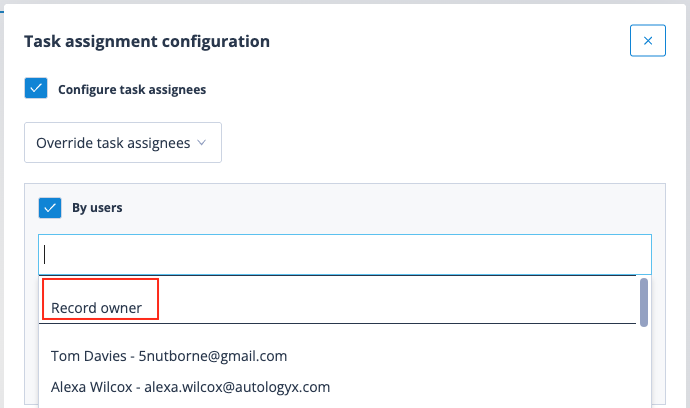
The default configuration has Configure task assignees ticked and Override task assignees selected, as it is the most commonly used. This can be unticked if not required.
Configure task assignees
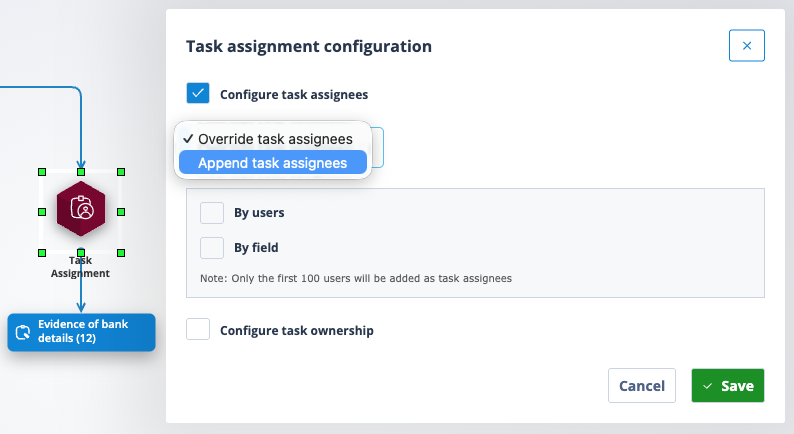
Override task assignees
This option will REMOVE any default task assignees/owners defined in the Sequence Properties and replace them with the users specified in the actor for this task.
Users can be selected By users or By field.
By users
Tick the box and start typing the name of the required user. The user list will filter accordingly.
Click on the required user and either save the configuration or, if more than one assignee is appropriate, start typing again. You can of course scroll through the list if you prefer.
Continue selecting users and save the configuration.
Note that you have the option to select the Record owner, if required.
By field
Tick the box and click into the Search for field drop down.
All user type fields associated with the sequence's object class will be shown.
This is a single selection; only one field can be chosen. Click on it and save the configuration.
If one user has been selected in this field on the record, they will become a task assignee and will be able to view and complete the task.
If several users have been selected in this field on the record, they will all become task assignees and any one of them will be able to view and complete the task.
It is possible to use a combination of task assignment By users and By field. All users selected will become task assignees:
Append task assignees
This option will add the specified users in addition to any defaults defined in the sequence properties.
Configure task ownership
Set task owner is the only option in this section.
The Record owner can be selected as the task owner.
Task ownership can also be configured By users or By field, but not both.
Only one task owner can be assigned.
However this is configured, the selected user will become both the task owner and a task assignee.
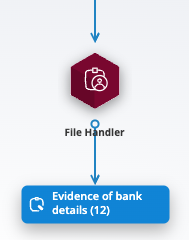
Best practice: As with all other sequence actors, it is best practice to replace the default actor name with something more descriptive or meaningful.
Right click on the actor and select Properties. Enter the new label and save.
| The new label will appear under the Task Assignment actor. | Screenshot 2026-04-15 at 15.20.08.png |
Note: In addition to Users, User Groups can also be made Assignees of tasks to allow any User within that User Group to complete the task. However, currently this is configured using an API call after the Task is created.
Useful info
- A task assignee can take ownership and a task owner can give up ownership of a task, but they will still remain a task assignee.
- A Task Assignment actor can follow any sequence actor (other than a Sequence Runner) but should precede only a Create Task actor or Set Task actor.