
What are task group templates?
We use Task group templates to manage multiple tasks at the same time.
For example, in a Sequence, a task group template can be used to create several tasks at once for an Object record. They can aslo be used in reporting to determine that a set of Tasks is complete.
Task group templates can be created and edited from the Task group template list.
Visibility and list access
The Task group templates list will only be visible to Users who meet one of the below options:
| - have a Super Admin account - have a Role where the system permissions under the Task configuration tab for Task Group Templates have been enabled for create and edit or edit only | mceclip0.png |
This list has all the usual features of lists in your system. More details about those can be found HERE.
Default columns
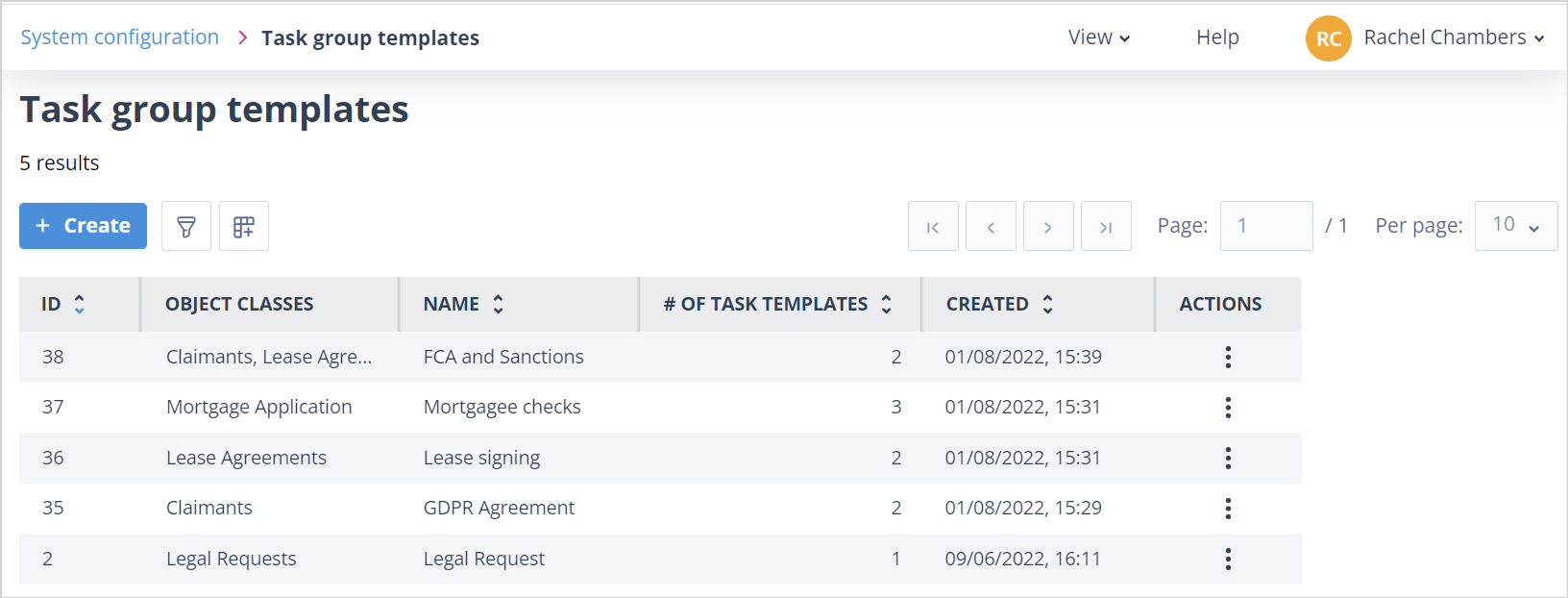
The default columns are as follows:
- ID - A unique number given to the Task group template which is automatically applied by the system on creation of the template. This is useful for aiding recognition when debugging, etc. when you have a number of templates with similar names.
- Name - The Name given to the Task group template on creation or when last edited.
- # Of Task Templates - Shows you the number of Task templates contained in the Task group template.
- Created - Gives the date/time stamp of when the template was created.
- Actions - The menu which will allow a User to Edit or Delete the template depending on their permissions.
Another column which can be added, and is particularly useful as your Task group template list becomes more comprehensive, is Object Classes. This column will show the object classes which have been selected in the template and therefore for which object classes the Task group template will be available to use in a Sequence.
Useful info
- The maximum number of Task group templates you can have in your system is 10,000.
- Only Tasks with the Task creation mechanism Automatic can be added to a Task group template.