
What are Task templates?
We use Task templates to create Tasks for Object records. The Task template should be thought of as a blueprint for the Task. It determines:
- how the Task presents to the User responsible for completing it
- what instructions are given
- what type of response is expected
- whether it is a Task which is done only once or has an expiry and will renew
Task templates can be created and edited from the Task template list.
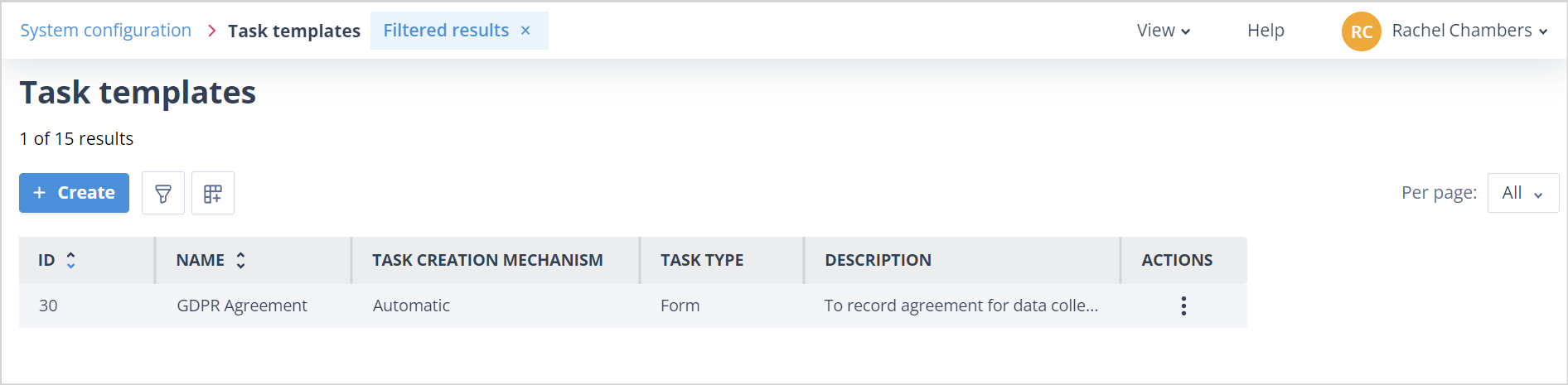
Task templates list
The Task templates list will only be visible to Users who meet one of the below options:
| - have a Super Admin account - have a Role where the system permissions under the Task configuration tab for Task Templates have been enabled for create and edit or edit only | mceclip0.png |
This list has all the usual features of lists in your system. More details about those can be found HERE.
Default column headers
The Task templates list has the following default column headers:
ID - this is a unique number applied to the Task template on creation. It should not be confused with the Task ID which is given when a Task is created from a Task template for an Object record.
| The Task template ID number for "GDPR Agreement" is 30. | mceclip0.png |
| This Task template has been used to create Tasks for Record IDs 402 and 401. The Task IDs are 347 and 342 respectively. | mceclip1.png |
Name - the Name given to the Task template. Please note that for a Manual Task, although the User will find the Task template using this Name, they can give the Task a completely different Name when creating it for an Object record.
Task creation mechanism - shows whether the Task template can be used to create Tasks automatically from a Sequence or manually on the Object Record in the Tasks tab of the side panel.
Task type - there are two Task types:
- Self contained form - this is constructed of Fields which are unrelated to any Object class and therefore can be used to create Tasks for Records in any Object class
- Update object record - this is configured for a specific Object class and allows the User to select Fields from the Object class (which will update the Record when the Task is completed) and, if wanted, additional Fields which are not related to the Object class
Description - used to describe what the Task is for, and under what circumstances it may be created for a Record.
Actions - has an Edit option which allows the User to change certain elements of the Task template. Click HERE for information.
Other useful columns
Other useful columns which can be added via the Column configuration link are:
# Tasks created - shows how many Tasks have been created from the Task template.
Last task created - shows a date/time stamp for when the Task template was last used to create a Task.
Useful info
- The maximum number of Task templates you can have in your system is 10,000.