
Sequences list
Firstly, for those of you who don't know what our Sequencer does, click HERE.
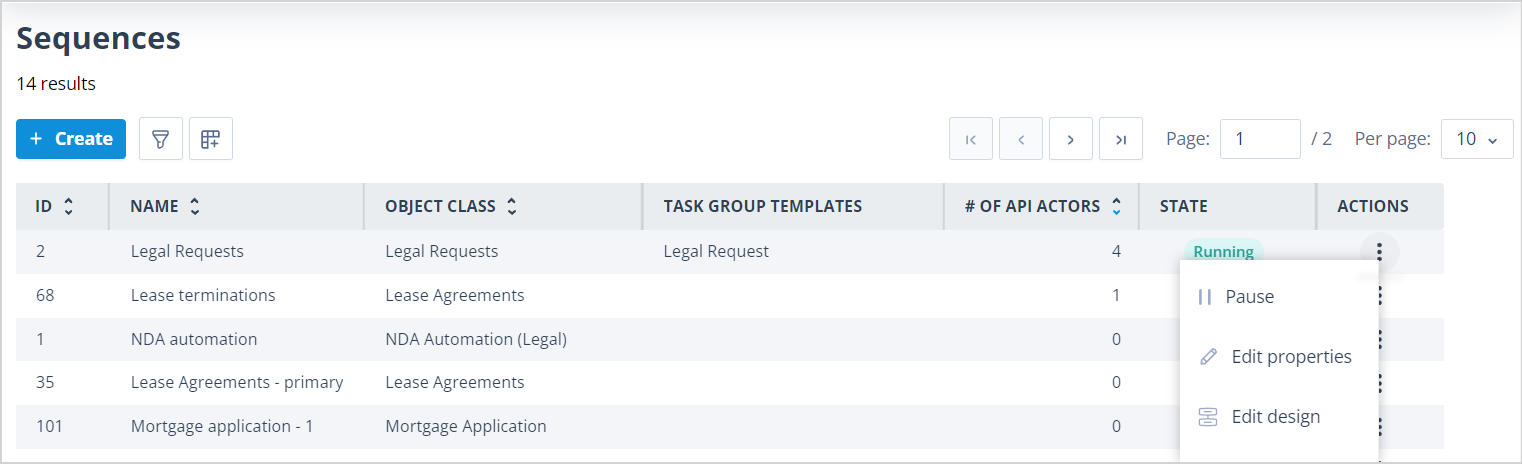
Sequences can be created, edited, run, or paused from the Sequences list.
Visibility
The Sequences list will only be visible to Users who meet one of the options below:
| - have a Super Admin account - have a Role where the system permissions under the Sequencer tab have been enabled for create and edit or edit only NB although you do not have to be the Object class Owner to edit the Sequence properties, you must have this additional permission in order to edit the design. | mceclip0.png |
List features
This list has all the usual features of lists in your system. More details about those can be found HERE.
Default columns
The default columns in this list are as follows:
- ID - a unique number given to the Sequence which is automatically applied by the system on creation of the Sequence. This is useful for aiding recognition when debugging, etc. when you have a number of Sequences with similar names.
- Name - the Name given to the Sequence on creation or when last edited.
- Object class - shows the Object class for which the Sequence has been created and thus determines which Object records it may be run against.
- Task group templates - this column displays the Name(s) of any Task group template(s) included in the Sequence design.
- State - shows the current state of the sequence. States are:
- Paused - all newly created Sequences will be in this state until they are set to a state of running when the option to Resume is selected in the Actions menu.
- Running - the Sequence is "live". Depending on the starting conditions for the Sequence, it will run against Object records when they are created or when fields in the Record are updated.
Actions
Actions - Super admin Users, and Users with a Role permission which allows them to Edit Sequences, will see the following options:
- Edit properties - this will allow you to change the Sequence Name, Description and Default task assignees. Click HERE for more information.
Additional visibility for actions
Super admin Users, and Users with a Role permission which allows them to Edit Sequences and who are the Object class Owner, will see the following options:
- Resume or Pause - if the Sequence is running, the option to Pause it will be shown; if the Sequence is paused, the option to Resume it will be shown. When a Sequence is paused, any Tasks which have already been created can still be completed. However, their completion will not cause the next Task to be created or will not trigger an API call or an Update record to occur because connecting triggers will be dormant. When a Sequence which was paused is resumed, the completion of a Task which had already been created would cause the connecting trigger to fire and therefore the next action would occur.
- Edit design - this will allow you to change your workflow by adding or removing Task templates, task group templates and Sequence Actors such API calls and Send messages. Click HERE for more information.
Other useful columns
Other particularly useful columns which you might want to add to the list are:
- # of API actors - this will tell you the number of API actors present in each Sequence.
- API actor names - if API actors are present in the Sequence, this column will show the names of each API actor. This is the Name configured in the API actor as shown below:

Useful info
- The maximum number of Sequences you can create in your system is 1,000.